Wiring and the node bank
Forty-one modules, each one honest about what the model does and does not know about it.
The catalogue
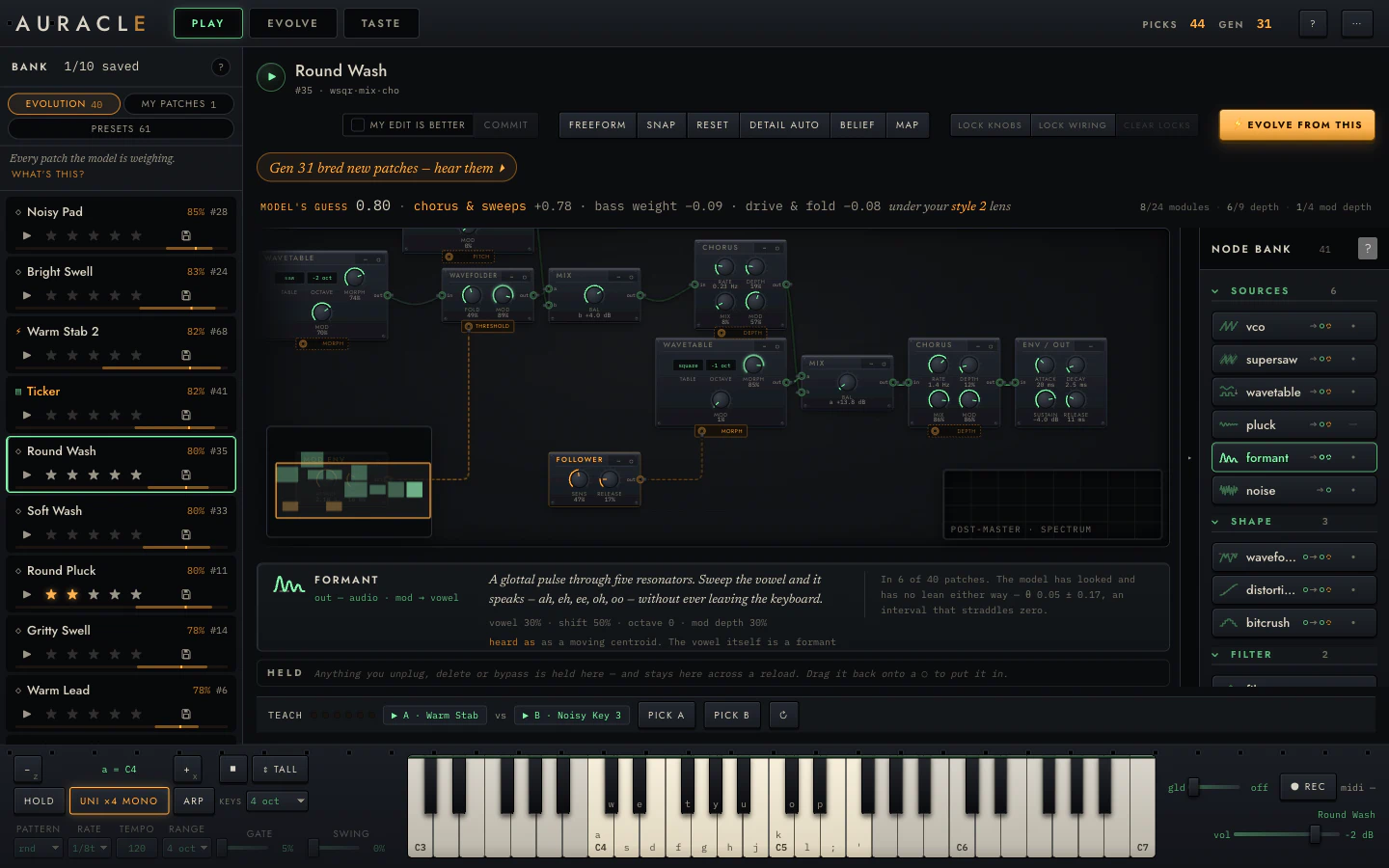
The rail on the right of PLAY is the instrument's inventory: forty-one modules in eight groups, ordered along the signal path: sources → shape → filter → space → motion → dynamics → combine → modulation. That way "what goes after a filter" is a question the ordering answers.
Every entry carries four things at rest:
- A transfer-function glyph showing what this does to a wave.
- The name a synthesist would use.
- A port signature in both phosphors: what it takes and what it gives.
- A θ bar with a ±σ whisker: what the model thinks of this module. It appears only once the model has been fitted and at least five patches in the pool use it. Below that it draws a dash.
That threshold matters. "The model barely likes this" and "the model has never seen this" are completely different statements and should not look alike.
Searching it
/ focuses the index. It matches by sound as well as by name: grit finds distortion and bitcrush, wander finds sample-and-hold random, vowel finds the formant oscillator.
The spec card
Hovering or focusing an entry opens its card:

Five things:
- One sentence in the instrument's voice.
- The port map.
- The parameters it will arrive with.
- What the model believes, with four ways of saying nothing: not measured / not fitted / too few examples / here is the belief, with its interval. The card above shows an interval straddling zero, which means the model has looked and found nothing.
- heard as: what the feature extractor can and cannot pick up about this module. Chorus's card says outright that the model will never learn it, because the feature vector has no stereo-width coordinate.
That fifth line tells you when your preference is real but invisible to the machinery. In that case, starring patches that use it will not teach the model what you think it is teaching.
Placing a module
Arm and place is the primary path:
- Click an entry. It is now in your hand.
- Every socket it can legally go into lights up and names what will happen there: green inserts ahead of what is in the socket, amber replaces it.
- Click a lit ○ to place. Esc to put it down.
Press-dragging from an entry also works, and a missed drop tells you so.
Every placement is one undo step, and the confirmation toast offers take it out.
From the keyboard
The whole path has a keyboard equivalent:
| Tab | Reach the catalogue (one tab stop per group) |
| ↑ ↓ | Walk the entries |
| Enter | Arm the module |
| ↑ ↓ | Then walk the lit sockets, each one announced |
| Enter | Place |
| Esc | Put it down |
Dragging cables
Drag from an out jack. As you drag:
- Every legal input lights up. Illegal ones do not, and the dragged module's own subtree is excluded, so you cannot create a cycle.
- The cable snaps within a tolerance.
- Dropping into empty space opens the catalogue filtered, with the socket pre-chosen.
- An illegal drop says why.
Click-source-then-click-target reaches the same place, with roving focus.
If you drop an output onto something that already has a consumer, you get a pinned two-choice offer naming both consequences in plain English: "A copy: one output cannot feed two places."
Modulation chains
A modulation input does not take "an LFO". It takes a modulation term,
which can be a chain: s&h rand → quantize → slew before it ever reaches a
cutoff. The rack draws the whole chain in amber.
Consequences in the interface:
- Dropping a CV shaper onto an occupied slot wraps what is already there rather than evicting it.
- The socket tells you which of fill / replace / wrap you are about to do.
- Depth is bounded, so a modulation cannot be wired to swamp its destination.
Nearly every module carries a modulation slot with a named destination; on the
oscillators the slot bends pitch. The exceptions are the ones with nowhere
sensible to send it: noise, whose only control is a colour switch, and mix
and ring mod, whose two inputs are both audio and whose single knob is the
blend.
Binary modules
Six processors take two inputs, and the distinction matters when you wire them:
| Second input | ||
|---|---|---|
| mix (crossfade), ring mod | audio | Merges two chains into one |
| comp, duck, gate, vocoder | control | Real sidechaining, in a typed tree |
In the second group the second input is a control signal, not audio, and the rack will not let you wire it as though it were.
IN THIS PATCH
Above the catalogue, what the current patch is made of. Clicking a pill jumps to that module in the rack.
The HELD tray
Anything you unplug, delete or bypass goes here, and stays across a reload. Drag it back onto any lit ○ to put it in.
Collapsed, the rail keeps its name and the count of what is held below it, so staged work is never hidden silently. The rail's width, its collapsed state, and which groups are folded all persist.