Reading and editing the rack
Every knob is an address in the genome, which is why turning one teaches the machine something.
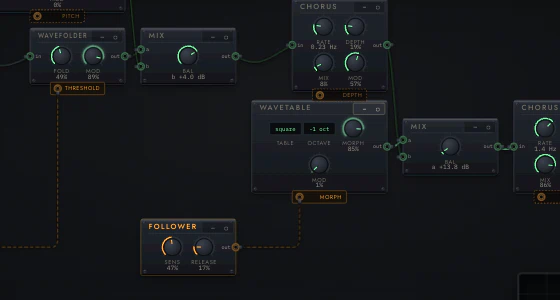
Reading it
Green is sound. Amber is the model's mind, and modulation. That rule holds everywhere in the instrument.
- Modules are plates with a title, a ⋯ menu, and their controls. Knobs wear
a value arc and read in musical units (
840 Hz,24 ms,−6.0 dB,+12 ¢,8.23 Hz) rather than a normalized 0–1, because you are being asked to make a musical judgement and0.63is not one. - Jacks are small rings labelled
in/out. Their colour tells you the signal kind, and only matching kinds will connect. - Audio cables are green and run left to right through the signal chain.
- Modulation cables are amber, and each one ends in a named
destination:
PITCH,THRESHOLD,MORPH,DEPTH. A modulation cable pulses at its modulator's rate, so you can see a 0.2 Hz sweep before you hear it. - The last module is always
ENV / OUT: the amp envelope and the output stage. Every patch has one, with a limiter compiled in ahead of it that you cannot remove.
The rack scales to fill its frame and centres itself. At small sizes the
detail auto setting drops knobs from plates once they are too small to grab,
so a very large patch shows as bare plates until you zoom in.
Navigating
| Home | Fit the whole patch |
| . | Fit what you are on |
| ⌘0 | Actual size |
| ⌘− / ⌘= | Zoom out / in |
| ctrl + wheel, or pinch | Zoom at the pointer |
| wheel, or drag on bare canvas | Pan |
| space + drag, or middle-drag | Pan from anywhere on the canvas |
| map | Show the minimap, bottom-left |
| shift-click the minimap | Bookmark a spot |
| shift + 1–9 | Jump to a bookmark |
Zoom runs 0.30×–2.50×, and it fits to the frame on load (capped at 2.2× there).
Turning knobs
Drag a knob, or focus it and use ↑/↓; hold
Shift for fine. Click a selector (saw, square, −2 oct) to
cycle it.
Every edit is a one-site write at that knob's trace address. The patch is re-rendered and re-vetted before it can be auditioned, and the live instrument is re-patched immediately so held notes keep sounding.
Edits are staged. The toolbar's commit inserts the result as a new candidate, leaving the original intact. ⌘Z / ⇧⌘Z undo and redo.
my edit is better is a separate claim. Ticking it teaches the model an "edit beat original" duel, which the TRUST tab scores separately from duels you actually listened to.
A knob's whole face is grabbable, including under its ticks and value arc, and a jack's ring responds across its full diameter. If you remember these feeling fiddly, try again.
Layout
The first button cycles three layout modes, and its label shows the one you are in:
| chain | The signal path on one baseline |
| compact | The same path, packed tight |
| freeform | Yours. Drag a plate by its faceplate and it snaps to the grid; hold shift to place it freely |
Then:
| snap | Pin everything where it currently sits, on the 24px grid. This is how you start hand-arranging an evolved patch |
| reset | Throw away the hand positions and re-lay along the signal chain |
| detail | auto drops knobs when plates get too small to grab; force it on or off |
| belief | Tint each plate by what the model believes about its family: amber toward, red away, stronger where it is certain. Off by default |
Positions are kept per patch, survive a reload and a generation of ⚡, and travel inside an exported patch file. If a hand layout has spread past anything the frame can show, snap re-lays it from the signal chain instead of pinning it somewhere you cannot see.
Locks, and evolving from here
- Click a knob's lock dot to freeze that knob.
- Click a module's ▢ to freeze the whole module.
- lock knobs / lock wiring freeze every parameter, or the whole structure.
- clear locks releases everything.
Then ⚡ evolve from this: refinement mutates everything except the locked addresses.
A proposal that would change, delete or create any locked address is rejected. Both directions matter: allowing a birth at a locked address while rejecting the death that would undo it lets the search drift into locked structure and stay there.
One limit. A lock is a set of exact addresses, so a structural move that grows a brand-new address inside a locked module is not caught, because that address existed in neither version. "Locked" is a promise about addresses, not about subtrees.
The ⋯ menu
Per module: bypass, delete, replace with…, insert after….
The last two hand off to the node bank with the socket already chosen and lit, so there is one module inventory in one place.
Anything you bypass or delete goes to the HELD tray rather than disappearing, and stays there across a reload.
Exporting a patch
From ⋯ → Export this patch (JSON) or Export as image… (PNG or SVG, at a scale and background you choose). The exported image contains the patch: an Auracle PNG or SVG can be imported back, so a screenshot of a rack is also the rack.