Auracle
A playable modular synthesizer that learns what you like, and can show you what it learned.
Auracle generates patches by evolutionary search, plays them to you, and asks which one you prefer. From your answers it fits a model of your taste, with uncertainty you can inspect, and uses it to steer the search. Over a session it stops guessing and starts proposing.
It is also just a synthesizer. Four-voice polyphony, a keyboard, MIDI, an arpeggiator, a patchable rack with typed cables and forty-one modules. You can ignore the model entirely and play it like an instrument.
What makes it different
Sound design tools usually make you choose. Presets and randomizers are fast and shallow: you audition until something works, and nothing accumulates. Patching from scratch is deep and slow. Genetic-algorithm synths tried to bridge the gap with star-a-generation workflows, but they forget everything between sessions and cannot tell you why they suggest what they suggest.
Auracle treats the problem as inference instead:
- Every patch is a term in a typed grammar: a tree whose types are signal kinds. Every mutation, every crossover and every edit you make by hand produces a patch that is still valid and still playable.
- Your taste is a model with a posterior. It is built from a handful of independent style lenses, so you are allowed to like several unrelated things. It carries uncertainty, and it predicts every vote before you cast it, so you can check whether it was right. The TRUST tab is where it reports on itself.
- The search proposes toward you. What the model learns reshapes how evolution proposes, not only how it scores. Lock the parts you love and refinement leaves them alone.
- One compiler serves both. The patch you play live is the same one that was evolved, vetted and measured. There is no separate "render version".
For the machinery rather than the workflow, see the Reference, which carries the math.
The shape of a session
Three views, one loop between them.
| View | Shows | What you do there |
|---|---|---|
| PLAY | the patch | Hear it, play it, turn its knobs, rewire it, lock what you like |
| EVOLVE | the question | Two candidates; pick one. This is what teaches it |
| TASTE | the answer | What it thinks your taste is, how sure it is, whether it has been right |
You will spend most of your time in PLAY and EVOLVE. TASTE is where you go to find out whether it is working.
Open it, pick 3 of 9 presets when it asks, then answer duels in EVOLVE. After a dozen or so picks press EVOLVE POOL and listen to what it bred. That is the whole loop.
What to expect
Auracle is pre-1.0. The instrument is finished enough to play for hours and the taste loop is closed end to end, but:
- It takes real evidence to learn anything. A handful of duels is not a taste model. Expect the first useful proposals after a dozen or two picks, and confident ones considerably later. From a cold start it takes hundreds of duels, which is why the three-pick warm start exists.
- It will tell you when it does not know. Early on, TRUST will say the model is not beating a coin flip. That is the display working, not failing.
- The save format may change between versions. Your session lives in your browser and there is a migration path, but export anything you care about.
- Desktop only, for now. A phone or small tablet gets a stand-in screen instead; see browser support.
Where to go next
- Never used it → Your first session
- Want it running locally or offline → Running it yourself
- Already playing, want the key map → Keyboard and MIDI
- Want to know how it works → the Reference
- Something is wrong → Troubleshooting
Your first session
Fifteen minutes, start to a model that proposes.
Open the instrument. Nothing to install. Everything below happens in one browser tab, and it all persists when you close it.
0. Boot
The engine compiles, then fills a pool of candidate patches. Each one is generated, compiled, rendered as a fixed five-second phrase, checked for pathology and measured. That is about forty renders, so the boot bar takes a moment.
You do not have to wait for all of it. At 8 patches the first duel is dealt; the rest fill in behind you while you play. On a machine with cores to spare the renders run in parallel.
Every candidate is rendered and inspected before it can reach your speakers: finite samples, a peak ceiling, not silent, not DC-dominated. Evolution does produce screaming resonance and silent duds; the gate is why you never hear them. A patch that fails is quarantined, and the search is told to avoid that region.
1. The warm start: pick 3 of 9
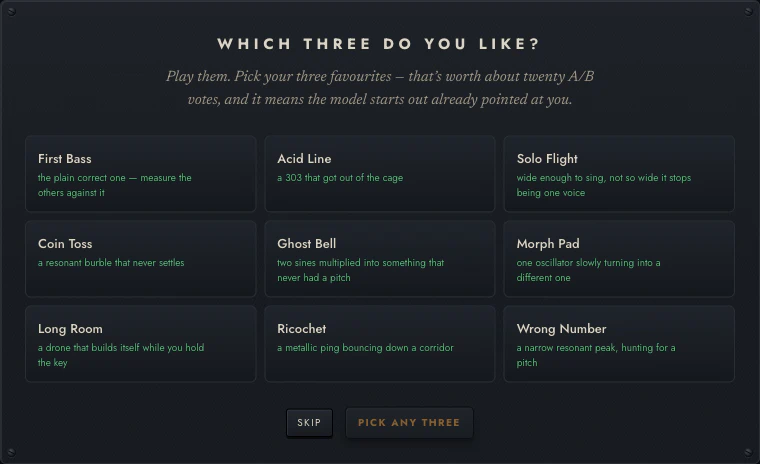
On first run you are shown nine presets, drawn one per family from the built-in library and then filled out to nine, and asked to pick three.
Do it. It takes thirty seconds and it is worth 18 pairwise observations: each of your three picks beats each of the six you passed over. That is the difference between a model that has an opinion by the end of your first session and one that does not.
Pick on sound alone. There is no wrong answer and you are not committing to anything; the model treats these like any other preference, and they fade with time like any other.
You can re-run it later from the ⋯ menu → Re-run the three-pick warm start.
2. Answer some duels
Go to EVOLVE. You get two candidates, A and B.
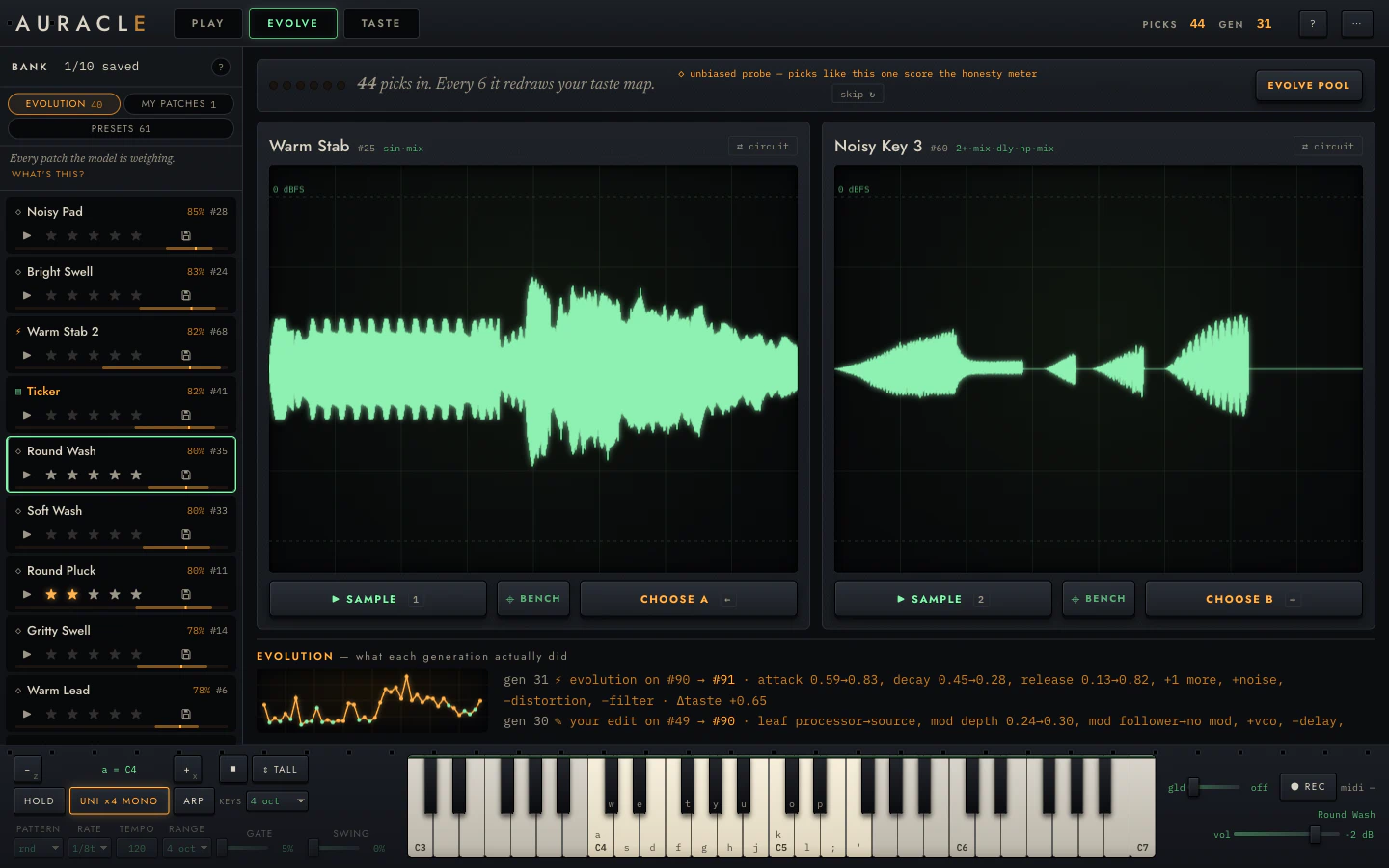
- 1 / 2 play the sample: the same fixed phrase for both, so you are comparing patches and not performances.
- Click a card to play that candidate live on the keyboard instead, if the phrase is not telling you enough.
- ← / → choose.
Answer ten or fifteen, and go fast. A duel is a gut reaction and the model handles noise; deliberating does not make the data better.
If neither is any good, that is still an answer: pick the less bad one. What the model learns from a duel is a direction, and "both mediocre but this one less so" is a real direction. There is also skip if a pair tells you nothing.
Watch the strip above the cards. It counts your picks and says when the model will next redraw its map. When it does, the E of the wordmark lights: that is the listening lamp, and it means a fit is running.
3. Look at what it thinks
Go to TASTE.
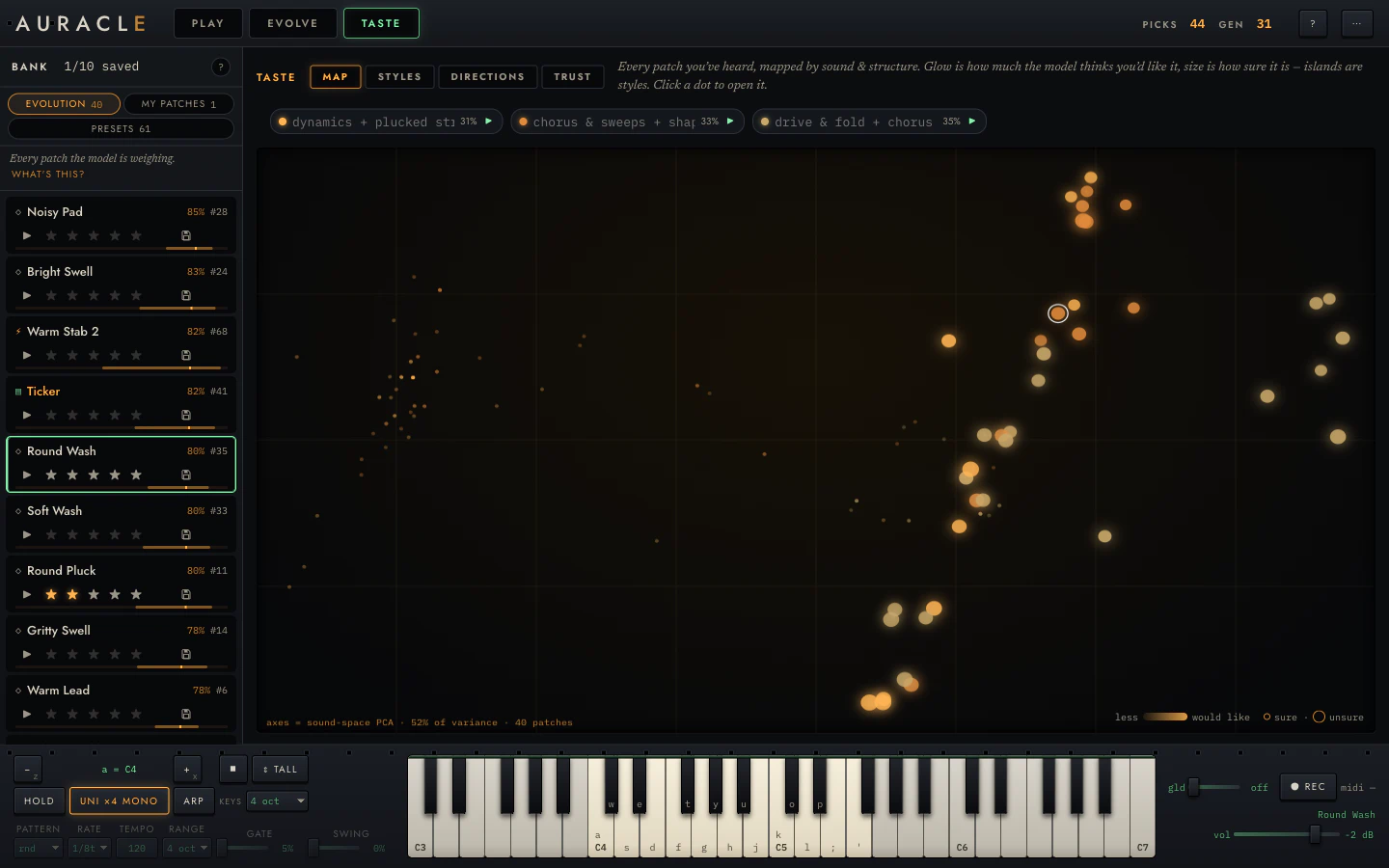
Early on this will be sparse and the styles will be provisional. Two things are worth checking even now:
- STYLES. Does any lens have a name that sounds like something you like? The names are generated from what each lens weights, so "drive & fold + chorus" means the model has noticed you leaning that way.
- TRUST. It will probably say it is not beating a coin flip yet. Good. It is telling you the truth, and that page explains why a plain hit-rate would have lied to you here.
4. Breed a generation
Back in EVOLVE, press EVOLVE POOL.
The model takes your best patches, walks each one a short distance uphill on what it now believes, and injects the children into the pool. The EVOLUTION strip below reports what each step did, in plain terms:
gen 31 ⚡ evolution on #90 → #91 · attack 0.59→0.83, decay 0.45→0.28,
release 0.13→0.82, +1 more, +noise, −distortion, −filter · Δtaste +0.65
Then keep duelling. New candidates are in the mix now, and the questions get better as the model gets less uncertain.
5. Keep what you like
Anything worth keeping:
- ★ stars it. That is an observation, and it teaches the model.
- save it. That is storage: it moves the patch to my patches and exempts it from eviction. It teaches the model nothing.
Two controls, two different jobs, and it is worth knowing which one you want.
Then what
You now have the loop. From here:
- Turn some knobs → Reading and editing the rack
- Rewire it → Wiring and the node bank
- Play it properly → Playing it
- Lock what you love and evolve around it →
⚡ evolve from this - Understand what the model is doing → What it learns from
Your whole session (bank, names, taste history, style names, layout) autosaves as you go and restores when you come back. Press ? in the app at any point for the full key map.
Running it yourself
Hosted in a browser, from a release bundle, or from source.
In the browser, hosted
alexnodeland.github.io/auracle/play/ is the live build. Every
push to main deploys it, and so does every tagged release.
Nothing to install, and nothing leaves your machine: the engine is WebAssembly running in your tab, and your bank and taste model live in your browser's storage. There is no account and no server to send anything to.
From a release bundle, offline
Every release attaches
auracle-vX.Y.Z-web.zip, the prebuilt instrument, no toolchain required. Unzip
it and serve the directory over HTTP:
unzip auracle-vX.Y.Z-web.zip
cd auracle-vX.Y.Z-web
python3 serve.py        # → http://localhost:8642
Any static server works (npx serve, php -S, …), but it must be HTTP, not
file://. The instrument uses module workers, and browsers refuse to load
those from a file URL.
The bundle is built from the same commit as the tagged live site, so the two are identical.
From source
Auracle's foundations (quiver-dsp,
fugue-ppl,
fugue-evo) come from crates.io:
git clone https://github.com/alexnodeland/auracle.git
cd auracle
make wasm     # build the engine into apps/web/pkg
make serve    # → http://localhost:8642
You need a Rust toolchain with the wasm32-unknown-unknown target and
wasm-pack. make wasm puts
~/.cargo/bin first in PATH: a Homebrew rustc earlier in the path lacks
the wasm standard library and fails confusingly.
To work on Auracle rather than with it, see
CONTRIBUTING.md.
make serve runs apps/web/serve.py, which sends Cache-Control: no-store.
Plain python3 -m http.server does not, and a browser's heuristic cache will
keep serving a stale worker.js or .wasm across rebuilds. That looks like a
rebuild that changed nothing, or an engine and a UI from two different commits.
Browser support
Auracle needs a current desktop browser. Specifically it needs AudioWorklet, WebAssembly, module workers and IndexedDB, all of which have been standard for years. It uses them hard.
| Chrome / Edge | Recommended. Best worker throughput, and Web MIDI works |
| Firefox | Fully supported. No Web MIDI, so keyboard and on-screen keys only |
| Safari | Supported. No Web MIDI. Boot is slower; render workers are capped |
Web MIDI is Chromium-only today. Without it everything still works from the computer keyboard and the on-screen keys; see Playing it.
Handheld devices
A coarse pointer with a viewport narrower than 620px does not boot the engine. You get a stand-in screen asking for a desktop, with a look around anyway link if you want to see the interface.
This is deliberate. Boot costs about forty audio renders, and a phone would pay for all of them and then have nowhere to draw a rack, a bank and a keyboard at once. A real handheld layout is still to be designed.
Tablets are supported if the viewport is big enough. Every rack gesture works under a finger: knob drags, cable pulls, locks, the ⋯ menus. Anything a mouse reveals by hovering is shown outright on a touch device, because hover-to-reveal on a tablet means never.
What it costs your machine
- CPU on boot. Around forty renders, spread across
min(cores − 2, 6)background workers, or two if the device reports 4 GB of memory or less. Set?farm=0in the URL to force the single-threaded path. - CPU while playing. Four voices of modular DSP on a real-time audio thread. Modest, but a browser doing heavy work in another tab can cause dropouts.
- CPU on a refit. Seconds of Markov-chain inference, off the audio thread. You can keep playing through it.
- Storage. Your session in IndexedDB. Tens of megabytes at most, dominated by the observation log.
Overrides
A few knobs, for when the defaults are wrong for your machine:
?farm=k | Use exactly k render workers. 0 is the serial path |
localStorage["auracle-renderers"] | The same, persisted |
The candidate pool is identical at every worker count, including zero: the draw stream is indexed and absorbed in index order. If a worker dies mid-boot, the fill falls back to the serial path over the same draws.
PLAY — the patch
One patch, in full, playable while you take it apart.
PLAY shows a single patch as its whole rack: every module, every cable, every knob at its true position. It is running live the entire time. Turn a knob and you hear it on the next note you play.

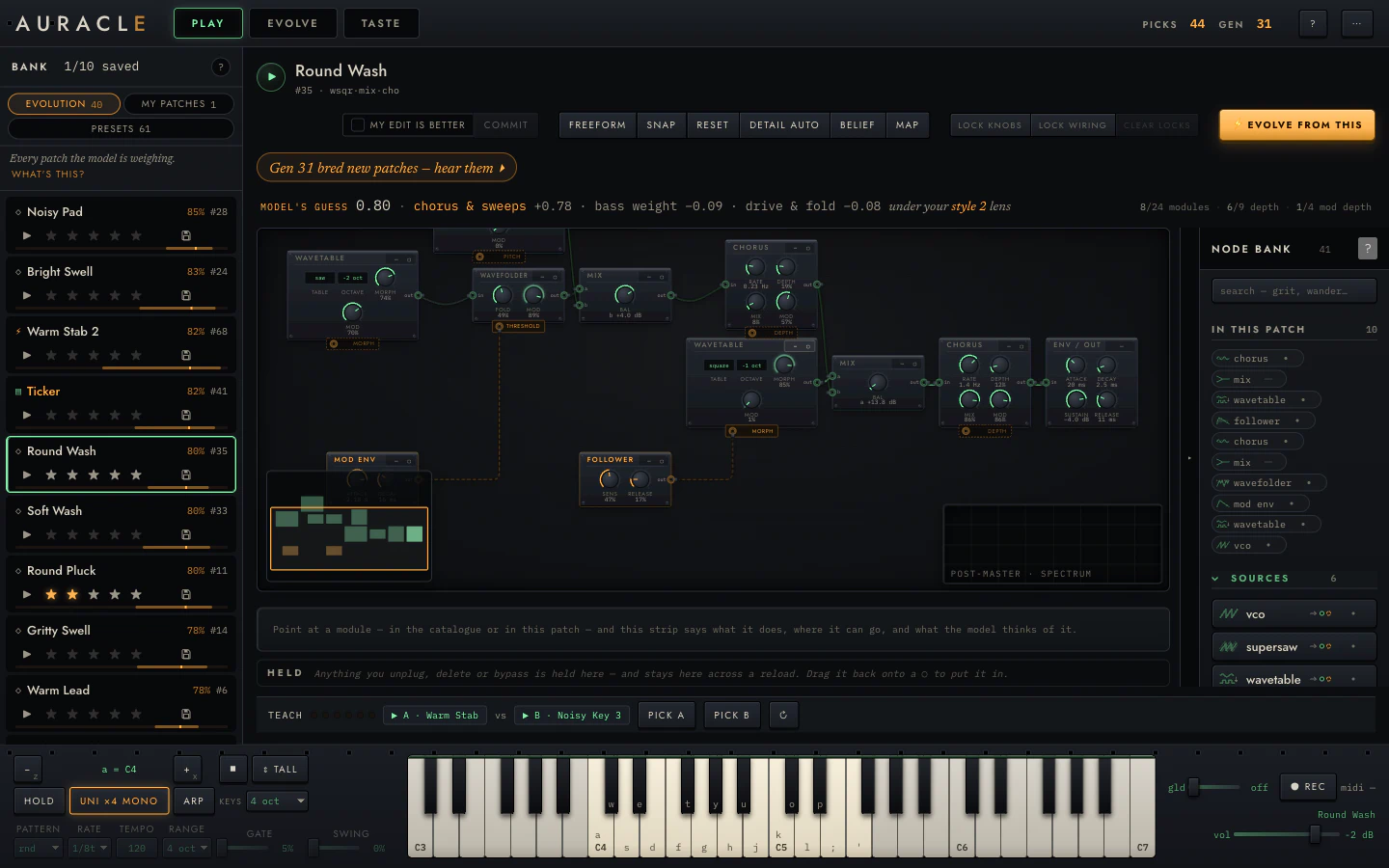
What is on screen
From the top:
The subject block. The patch's name, its id, and a short structural summary
(wsqr·mix·cho). The ▶ plays the standard sample.
The toolbar. The edit controls (commit, my edit is better), the layout and view controls (freeform / chain, snap, reset, detail, belief, map), the locks, and ⚡ evolve from this. All covered in Reading and editing the rack.
The next-step chip. An amber line that always says what to do now ("Gen 31 bred new patches — hear them ▸"). It is a suggestion; clicking it takes you there.
The belief row. What the model thinks of this patch and why:
MODEL'S GUESS 0.80 · chorus & sweeps +0.78 · bass weight −0.09 ·
drive & fold −0.08   under your style 2 lens
That is a prediction (how likely you are to prefer it in a duel), the three coordinates contributing most, and which style lens is currently judging it. When the model has no basis for a claim, this row says so instead of printing a number. See Reading what it learned.
Beside it, the budget: 8/24 modules · 6/9 depth · 1/4 mod depth. These
are the ceilings evolution searches within. A hand-built patch past them is
refused, and one at them has no room left to grow.
The rack. The patch itself. See the rack chapter.
The scope. Bottom right of the frame, tracing the output while you play. Configurable from ⋯ → Scope & analyser… (waveform or spectrum, tap point, FFT size, colour, corner, size, trigger, freeze).
The spec strip. The line under the rack that describes whatever you are pointing at, in the catalogue or in the patch.
HELD. The staging tray. Anything you unplug, delete or bypass lands here instead of vanishing, and stays across a reload. Drag it back onto any lit ○ to put it in.
The quick-pick strip. TEACH plus the current duel pair, so you can vote without leaving PLAY.
The keyboard dock. Playing it.
The three things PLAY is for
Hearing a patch properly
The standard sample is five seconds and identical for every patch, which is what makes candidates comparable. It is not a performance, though. Play the patch from the keyboard. Hold a chord. Run the arpeggiator. A patch that sounds thin on the sample can be excellent under your hands, and the sample cannot tell you that.
Changing it
Every knob is live and every structural edit is a grammar operation, so you cannot break the patch into something unplayable. Drag knobs, click selectors, drag cables between typed jacks, arm a module from the catalogue and place it. Undo with ⌘Z.
Changes are staged until you commit. Committing inserts the edited patch into the bank as a new candidate, leaving the original alone.
Aiming the search
This is the part that is easy to miss. Lock the knobs or the wiring you like, then press ⚡ evolve from this: refinement mutates everything except what you locked. Locked addresses are excluded from the search outright. See locks.
Find a patch whose character you like but whose envelope is wrong. Lock every knob except the envelope. Evolve. You get variations that differ only where you allowed them to.
Getting a patch here
- Click any row in the bank.
- Click the ⌖ on either side of a duel in EVOLVE.
- Click any dot on the taste map.
All three land the patch on the workbench, live and editable.
EVOLVE — the duels
Two candidates, one question, and the machinery that turns your answer into a better next question.

The duel
Two cards, A and B. Each carries a name, an id, and its rendered waveform. The names are generated from what the patch is, so Round Wash and Gritty Swell mean something.
| 1 / 2, or ▶ SAMPLE | Play the standard five-second phrase |
| Click the card body | Load that candidate live on the keyboard |
| ← / →, or CHOOSE A/B | Vote |
| ⊕ BENCH | Send it to the workbench in PLAY without voting |
| ↻ | Deal a different pair |
| skip | This pair is uninformative; do not record anything |
Both sides play the same phrase. That is the point: audio features are only comparable across patches under an identical stimulus, so the sample is a fixed five seconds: a held C4, a C5 stab, a C4+E4 dyad, and a low C3 with a long release tail. The reference explains why each segment is there.
Clicking the card instead gives you the patch live under your hands, which is often the faster way to tell two near-ties apart.
A duel is a gut reaction. The model is built for noisy answers and averages over them; a carefully deliberated vote is not worth more than a quick one, and deliberating is how a session stops being fun. If you cannot tell, press skip. A coin flip recorded as a preference is worse than no data.
The teaching meter
The strip above the cards is the session's state of play:

The pips count down to the next refit. Between refits your votes still count: each one is folded into the model immediately by reweighting, so the next question responds to the last answer. A refit is the expensive version: full Markov-chain inference over the whole log, a few seconds, off the audio thread. When one runs, the E of the wordmark lights.
◇ unbiased probe marks a duel that was drawn at random rather than chosen. Those are the ones that can score the model's honesty without circularity. See TRUST.
Because it often is one, on purpose. A pair the model already knows the answer to teaches it nothing. The default pairing is uniformly random over the pool, which makes every duel an unbiased calibration sample. There is also an information-seeking mode that deliberately serves near-ties. Either way, "these two sound similar" frequently means "this is a question worth asking".
EVOLVE POOL
Breeds a generation.
The engine takes the ten highest-scoring patches in the pool and runs a short Metropolis–Hastings walk from each, mutating structure and parameters with the proposal distribution tilted by what your taste model has learned, then injects the children. Weakest members are evicted to make room; anything you have saved is exempt.
It is local hill-climbing on what the model believes, not a draw from the target distribution. In practice that means children resemble their parents, and a generation moves the pool rather than replacing it. The reference is precise about this.
Nothing happens if there is no fitted model yet; there is no direction to climb in. Answer some duels first.
The EVOLUTION strip
What each generation did, per step:
gen 31 ⚡ evolution on #90 → #91 · attack 0.59→0.83, decay 0.45→0.28,
       release 0.13→0.82, +1 more, +noise, −distortion, −filter · Δtaste +0.65
gen 30 ✎ your edit on #49 → #90 · leaf processor→source,
       mod depth 0.24→0.30, mod follower→no mod, +vco, −delay
Parameter moves are named and shown as before→after; structural moves as
+module / −module. Δtaste is how much the model's estimate of the patch
moved. The sparkline to the left is the pool's utility over generations.
Hand edits appear here too, tagged ✎ instead of ⚡. The lineage records everything that produced a patch, not only what the machine did.
A working rhythm
- Answer duels until the meter fires a refit. Ten to fifteen is a good first batch.
- Check TASTE. Has a style separated out? Is TRUST improving?
- EVOLVE POOL and listen to the children.
- Repeat. When a child is genuinely good, take it to PLAY, lock what you like, and ⚡ evolve from this for variations around it.
TASTE — the model's mind
Four views of one posterior: where your patches sit, what your styles are, what each one listens for, and whether any of it should be believed.
TASTE is full-screen and read-only. Nothing here changes the model; it is the model reporting on itself.
The style chips across the top are shared by all four tabs. Each carries a generated name, its share of the bank, and a ▸ that auditions that style's exemplar. Click a chip's name to rename it. The name persists and is used everywhere the style is mentioned.
MAP

Every patch you have heard, placed by sound and structure. It is a 2D projection (principal components of the feature space), and the footer tells you how much of the variance those two axes capture, typically around half. Worth knowing before you read too much into a distance.
The orientation is pinned, so the map does not mirror itself between one recompute and the next — somewhere you recognise stays where you left it. The axes themselves still turn slowly as your taste and the bank move, because they are computed from the patches you have actually heard.
| Channel | Means |
|---|---|
| Glow | Posterior mean utility — how much it thinks you would like it |
| Size | Posterior uncertainty — how sure it is |
| Hue | Which style lens claims it |
The size channel is easy to miss and it is the useful one. A big dim dot is "I have no idea about this". A small bright dot is "I am confident you like this". Early in a session everything is big; that is what a cold start looks like.
Click any dot to open that patch on the workbench.
STYLES
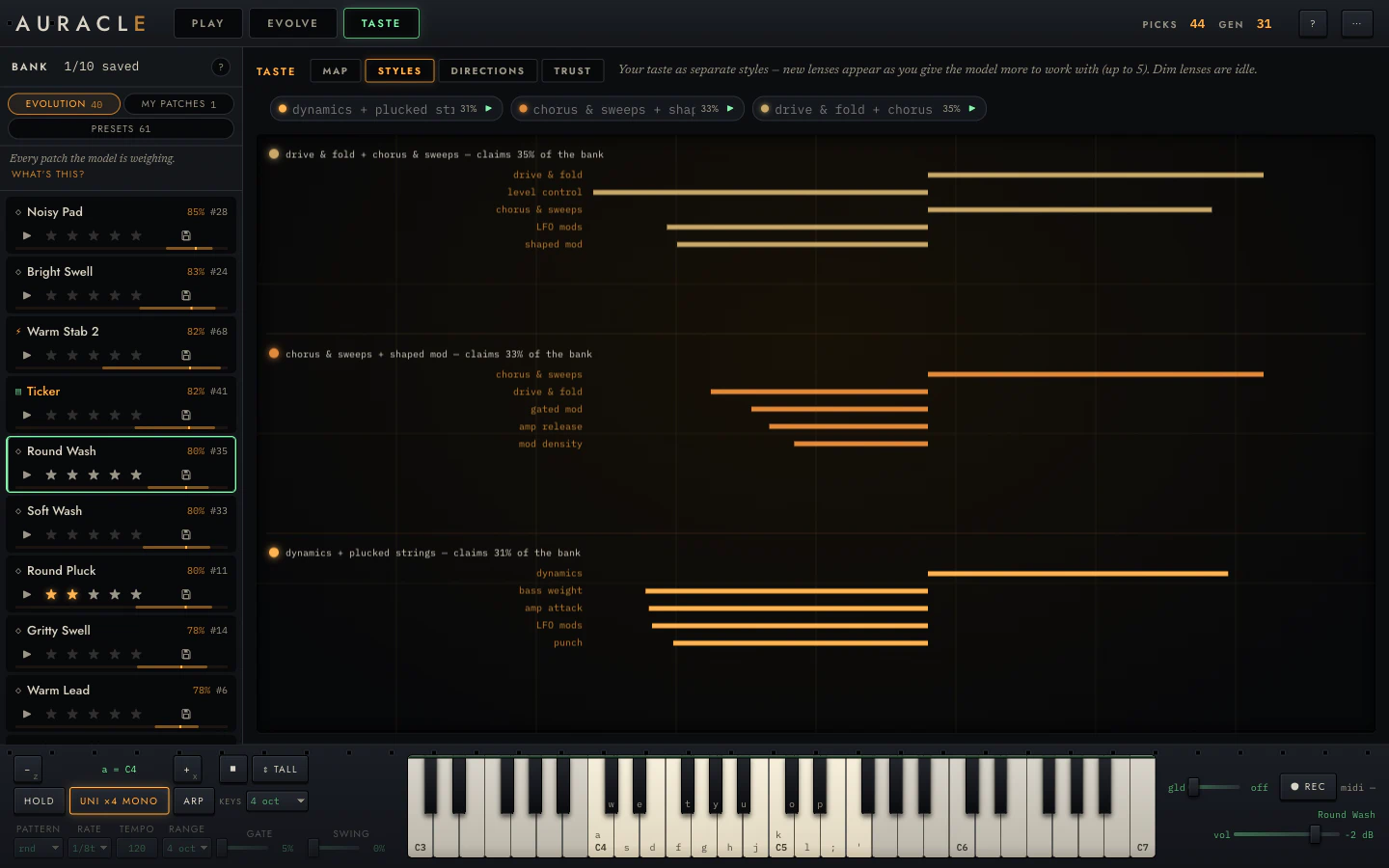
Your taste as separate lenses. Each shows its name, the share of the bank it claims, and its strongest coordinates.
This exists because taste is not one direction. You are allowed to like dark drones and bright plucks, and a single linear model would average them into a preference for neither. Auracle fits up to five lenses and scores every patch as its best lens's opinion, so a duel across two islands is still a well-formed comparison.
Lenses appear as evidence arrives. Early on you will have one; more separate out as the model finds structure it cannot explain with fewer. A dim lens claiming almost none of the bank is idle. Your taste has fewer islands than the model has capacity for, which is common and not a fault.
DIRECTIONS
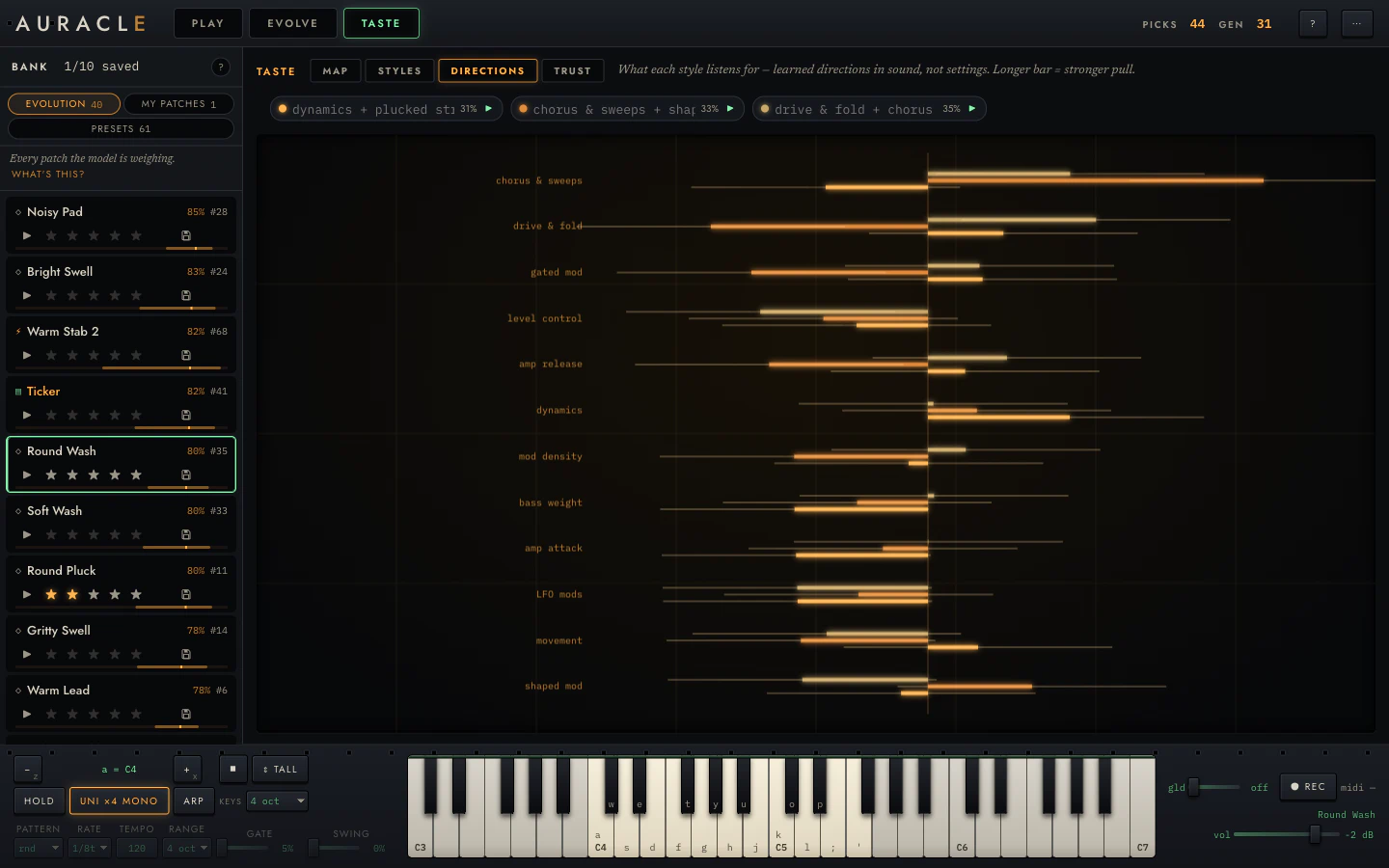
What each lens listens for, coordinate by coordinate. Bar length is the weight; the thin whisker behind it is the credible interval.
Read the whiskers, not the bars. A long bar with a whisker that crosses the centre line is a coefficient the model has not established: a guess that happens to be pointing somewhere. A short bar with a tight whisker is a real, small preference. Both are shown, because hiding the uncertainty is how a model starts sounding more certain than it is.
The coordinates are named in perceptual and structural terms: chorus & sweeps, drive & fold, bass weight, amp attack, mod density. What each one measures is in the reference.
TRUST — is its confidence honest?
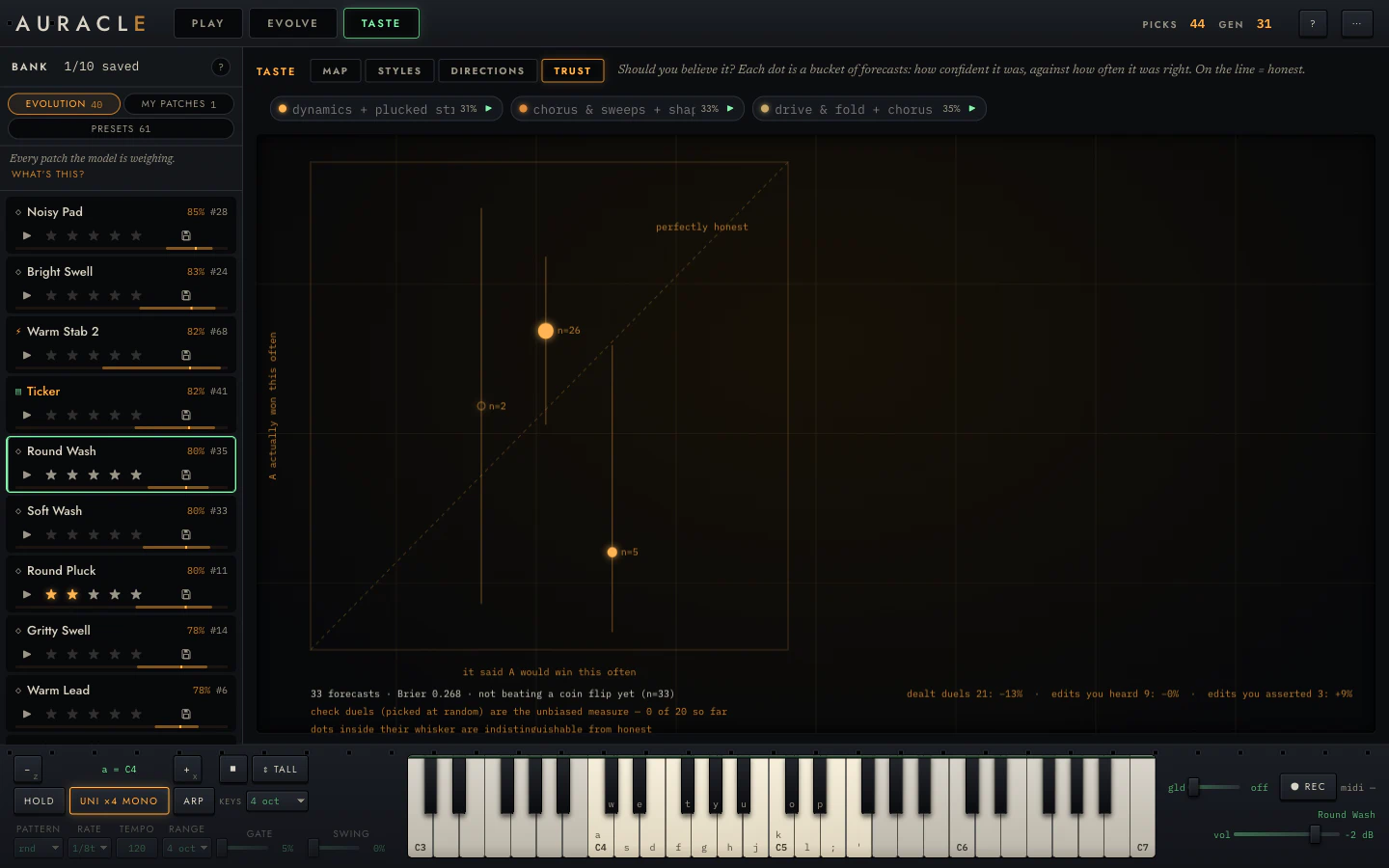
This is the tab that makes the rest trustworthy.
Every duel is forecast before you answer it. The model commits to a probability that A wins, then your answer arrives. Those are out-of-sample, one-step-ahead predictions, and this diagram scores them: the dashed diagonal is the model's claim, each dot is what happened at that confidence level, and the whisker is how much a bucket that size could wobble by chance.
Underneath, the numbers:
- Brier score. Mean squared error of the forecasts. Lower is better;
0.25is what always saying "50/50" scores. Reported as skill against that baseline, so0means no better than a coin and1means perfect. - check duels. The same score restricted to the randomly-drawn probes. This is the number without an asterisk.
- hit rate. Kept so you can see how misleading it is.
Because accuracy is not a proper scoring rule, and here it would lie. A model that says 0.51 every time and is right 51% of the time scores exactly like one that says 0.99 and is right 51% of the time. Worse, an information-seeking pairing rule deliberately asks near-ties, so the hit rate is pinned near 50% by construction: a perfectly calibrated model would look like a coin flip and you would conclude it had learned nothing. Brier skill moves when sharpness improves, which is what you want to watch.
Split out at the right, the same scores by where the answer came from: dealt duels, edits you heard, edits you only asserted. A hand edit you committed after listening and one you committed by ticking my edit is better make the same claim in the log, and there is no reason to assume they are equally reliable. This is how you find out.
"Not beating a coin flip yet (n=33)" is the correct thing to see early. It means the display is honest and you have not yet given it enough to work with. Keep duelling.
The patch bank
Three separate collections, each with its own rules.
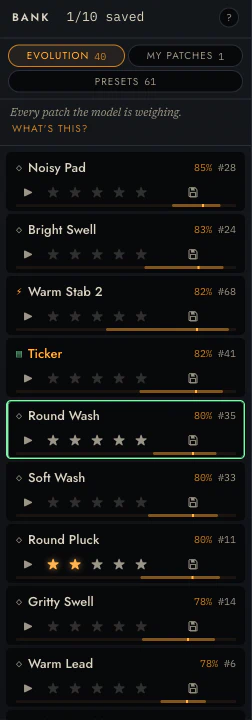
The rail on the left holds three of them:
| Bank | What it is |
|---|---|
| evolution | The live pool the model reasons over and breeds from |
| my patches | What you saved. Yours, permanent, never evicted |
| presets | The hand-made library, browsed in place |
The ? in the bank head walks you through what a generation is and what evolving costs.
Reading a row
Each row carries a name, an id, a prediction, stars and a save control:
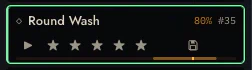
- The name is generated from what the patch is, and you can rename it.
- The percentage is the model's prediction: roughly, how likely you are to prefer this patch in a duel. It is blank when the model has no basis for a claim.
- The bar under the row is the same value, drawn.
- ▶ plays the standard sample.
- ★★★★★ rates it. This is an observation and it teaches the model.
- 💾 saves it. This is storage and it teaches nothing.
Stars are not saves
Two controls, two unrelated jobs.
★ is a judgement. It enters the observation log as an ordinal rating and moves the taste posterior. Rate honestly, including rating things low.
save is storage. It copies the patch into my patches and exempts it from eviction. It records nothing about your preferences.
Merging them is tempting and wrong. The pool evicts its lowest-utility members, so the moment a rating decides what survives, people rate strategically to protect patches, and every protective over-rating is a preference you never held.
The evolution pool is a working set with a fixed size, and breeding a generation evicts its weakest members. A patch you starred but did not save can be evicted. Stars are for teaching; save is what keeps.
Eviction and pins
The pool holds 40 vetted candidates. Injecting children removes the weakest to make room, by posterior utility.
(The engine's library default is 48; the web app asks for 40. If you see 48 quoted in the reference, that is why.)
Saving pins a patch so eviction skips it. Pins are capped at a quarter of the pool, so it can never be pinned solid and leave the search nowhere to put new candidates. The head shows your pin budget when you are near it.
Presets
Sixty-one hand-made patches across seven families — bass, lead, keys, pad, texture, perc, weird — browsed in place: clicking one loads it on the workbench without adding it to the pool.
They are worth playing through early even if you intend to evolve everything. They are what the warm start samples from, and they cover the palette's range more evenly than the prior does.
Keyboard
The bank is a single tab stop. Reach it with Tab, then:
| ↑ ↓ | Move the cursor |
| Enter | Open the patch |
| 1–5 | Rate |
| m | Save |
The save key is m rather than s because s is a note in the computer keymap, and note letters get through even when a control has focus. Binding save to it would have played a D every time.
Rows announce their full state to a screen reader (name, id, saved, rating, prediction), because the row's buttons sit outside the tab order and the label has to carry what they encode.
Reading and editing the rack
Every knob is an address in the genome, which is why turning one teaches the machine something.
Reading it
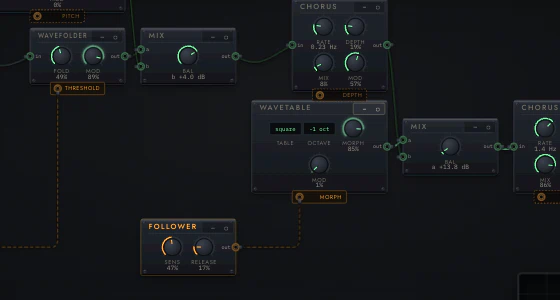
Green is sound. Amber is the model's mind, and modulation. That rule holds everywhere in the instrument.
- Modules are plates with a title, a ⋯ menu, and their controls. Knobs wear
a value arc and read in musical units (
840 Hz,24 ms,−6.0 dB,+12 ¢,8.23 Hz) rather than a normalized 0–1, because you are being asked to make a musical judgement and0.63is not one. - Jacks are small rings labelled
in/out. Their colour tells you the signal kind, and only matching kinds will connect. - Audio cables are green and run left to right through the signal chain.
- Modulation cables are amber, and each one ends in a named
destination:
PITCH,THRESHOLD,MORPH,DEPTH. A modulation cable pulses at its modulator's rate, so you can see a 0.2 Hz sweep before you hear it. - The last module is always
ENV / OUT: the amp envelope and the output stage. Every patch has one, with a limiter compiled in ahead of it that you cannot remove.
The rack scales to fill its frame and centres itself. At small sizes the
detail auto setting drops knobs from plates once they are too small to grab,
so a very large patch shows as bare plates until you zoom in.
Navigating
| Home | Fit the whole patch |
| . | Fit what you are on |
| ⌘0 | Actual size |
| ⌘− / ⌘= | Zoom out / in |
| ctrl + wheel, or pinch | Zoom at the pointer |
| wheel, or drag on bare canvas | Pan |
| space + drag, or middle-drag | Pan from anywhere on the canvas |
| map | Show the minimap, bottom-left |
| shift-click the minimap | Bookmark a spot |
| shift + 1–9 | Jump to a bookmark |
Zoom runs 0.30×–2.50×, and it fits to the frame on load (capped at 2.2× there).
Turning knobs
Drag a knob, or focus it and use ↑/↓; hold
Shift for fine. Click a selector (saw, square, −2 oct) to
cycle it.
Every edit is a one-site write at that knob's trace address. The patch is re-rendered and re-vetted before it can be auditioned, and the live instrument is re-patched immediately so held notes keep sounding.
Edits are staged. The toolbar's commit inserts the result as a new candidate, leaving the original intact. ⌘Z / ⇧⌘Z undo and redo.
my edit is better is a separate claim. Ticking it teaches the model an "edit beat original" duel, which the TRUST tab scores separately from duels you actually listened to.
A knob's whole face is grabbable, including under its ticks and value arc, and a jack's ring responds across its full diameter. If you remember these feeling fiddly, try again.
Layout
The first button cycles three layout modes, and its label shows the one you are in:
| chain | The signal path on one baseline |
| compact | The same path, packed tight |
| freeform | Yours. Drag a plate by its faceplate and it snaps to the grid; hold shift to place it freely |
Then:
| snap | Pin everything where it currently sits, on the 24px grid. This is how you start hand-arranging an evolved patch |
| reset | Throw away the hand positions and re-lay along the signal chain |
| detail | auto drops knobs when plates get too small to grab; force it on or off |
| belief | Tint each plate by what the model believes about its family: amber toward, red away, stronger where it is certain. Off by default |
Positions are kept per patch, survive a reload and a generation of ⚡, and travel inside an exported patch file. If a hand layout has spread past anything the frame can show, snap re-lays it from the signal chain instead of pinning it somewhere you cannot see.
Locks, and evolving from here
- Click a knob's lock dot to freeze that knob.
- Click a module's ▢ to freeze the whole module.
- lock knobs / lock wiring freeze every parameter, or the whole structure.
- clear locks releases everything.
Then ⚡ evolve from this: refinement mutates everything except the locked addresses.
A proposal that would change, delete or create any locked address is rejected. Both directions matter: allowing a birth at a locked address while rejecting the death that would undo it lets the search drift into locked structure and stay there.
One limit. A lock is a set of exact addresses, so a structural move that grows a brand-new address inside a locked module is not caught, because that address existed in neither version. "Locked" is a promise about addresses, not about subtrees.
The ⋯ menu
Per module: bypass, delete, replace with…, insert after….
The last two hand off to the node bank with the socket already chosen and lit, so there is one module inventory in one place.
Anything you bypass or delete goes to the HELD tray rather than disappearing, and stays there across a reload.
Exporting a patch
From ⋯ → Export this patch (JSON) or Export as image… (PNG or SVG, at a scale and background you choose). The exported image contains the patch: an Auracle PNG or SVG can be imported back, so a screenshot of a rack is also the rack.
Wiring and the node bank
Forty-one modules, each one honest about what the model does and does not know about it.
The catalogue
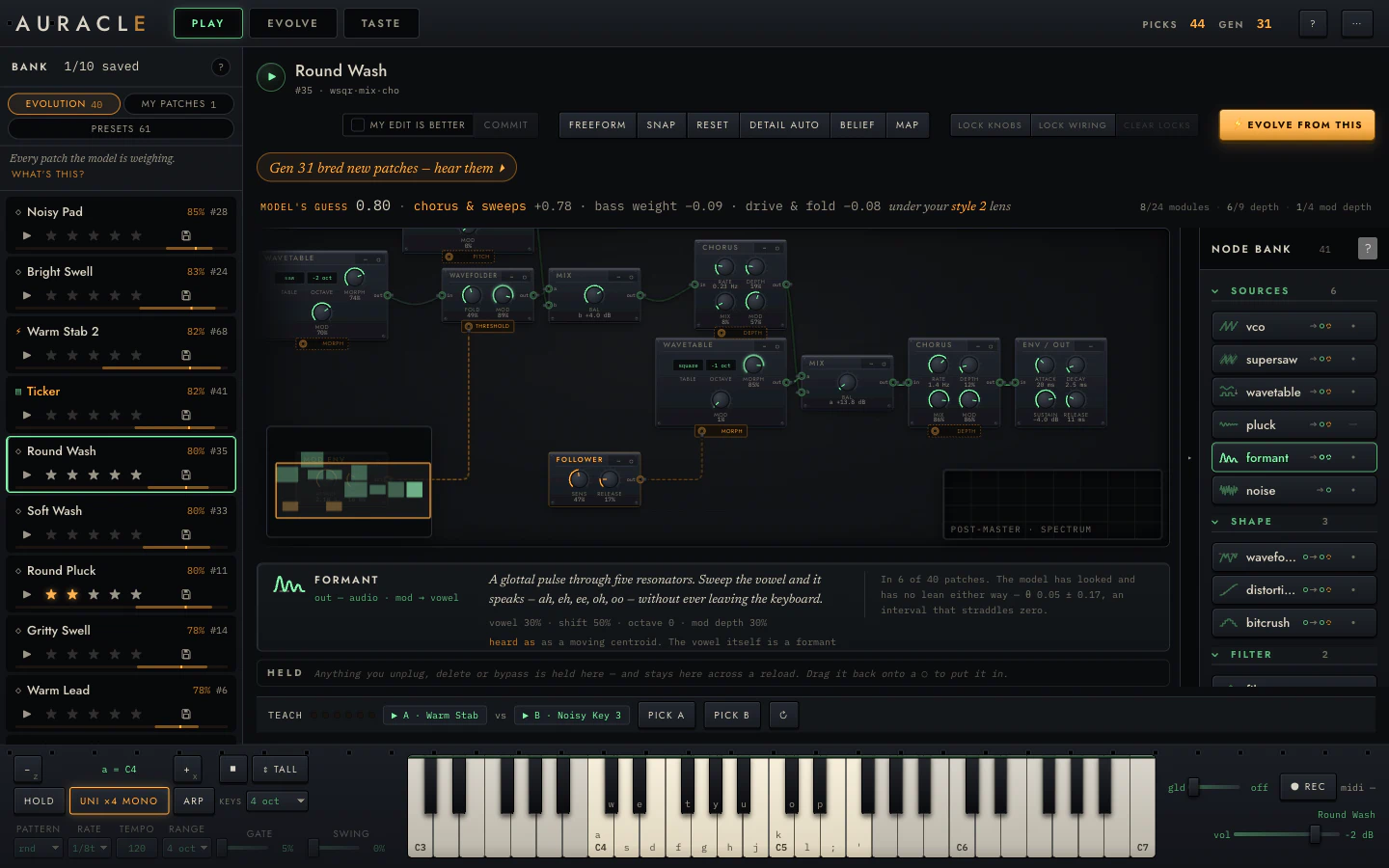
The rail on the right of PLAY is the instrument's inventory: forty-one modules in eight groups, ordered along the signal path: sources → shape → filter → space → motion → dynamics → combine → modulation. That way "what goes after a filter" is a question the ordering answers.
Every entry carries four things at rest:
- A transfer-function glyph showing what this does to a wave.
- The name a synthesist would use.
- A port signature in both phosphors: what it takes and what it gives.
- A θ bar with a ±σ whisker: what the model thinks of this module. It appears only once the model has been fitted and at least five patches in the pool use it. Below that it draws a dash.
That threshold matters. "The model barely likes this" and "the model has never seen this" are completely different statements and should not look alike.
Searching it
/ focuses the index. It matches by sound as well as by name: grit finds distortion and bitcrush, wander finds sample-and-hold random, vowel finds the formant oscillator.
The spec card
Hovering or focusing an entry opens its card:

Five things:
- One sentence in the instrument's voice.
- The port map.
- The parameters it will arrive with.
- What the model believes, with four ways of saying nothing: not measured / not fitted / too few examples / here is the belief, with its interval. The card above shows an interval straddling zero, which means the model has looked and found nothing.
- heard as: what the feature extractor can and cannot pick up about this module. Chorus's card says outright that the model will never learn it, because the feature vector has no stereo-width coordinate.
That fifth line tells you when your preference is real but invisible to the machinery. In that case, starring patches that use it will not teach the model what you think it is teaching.
Placing a module
Arm and place is the primary path:
- Click an entry. It is now in your hand.
- Every socket it can legally go into lights up and names what will happen there: green inserts ahead of what is in the socket, amber replaces it.
- Click a lit ○ to place. Esc to put it down.
Press-dragging from an entry also works, and a missed drop tells you so.
Every placement is one undo step, and the confirmation toast offers take it out.
From the keyboard
The whole path has a keyboard equivalent:
| Tab | Reach the catalogue (one tab stop per group) |
| ↑ ↓ | Walk the entries |
| Enter | Arm the module |
| ↑ ↓ | Then walk the lit sockets, each one announced |
| Enter | Place |
| Esc | Put it down |
Dragging cables
Drag from an out jack. As you drag:
- Every legal input lights up. Illegal ones do not, and the dragged module's own subtree is excluded, so you cannot create a cycle.
- The cable snaps within a tolerance.
- Dropping into empty space opens the catalogue filtered, with the socket pre-chosen.
- An illegal drop says why.
Click-source-then-click-target reaches the same place, with roving focus.
If you drop an output onto something that already has a consumer, you get a pinned two-choice offer naming both consequences in plain English: "A copy: one output cannot feed two places."
Modulation chains
A modulation input does not take "an LFO". It takes a modulation term,
which can be a chain: s&h rand → quantize → slew before it ever reaches a
cutoff. The rack draws the whole chain in amber.
Consequences in the interface:
- Dropping a CV shaper onto an occupied slot wraps what is already there rather than evicting it.
- The socket tells you which of fill / replace / wrap you are about to do.
- Depth is bounded, so a modulation cannot be wired to swamp its destination.
Nearly every module carries a modulation slot with a named destination; on the
oscillators the slot bends pitch. The exceptions are the ones with nowhere
sensible to send it: noise, whose only control is a colour switch, and mix
and ring mod, whose two inputs are both audio and whose single knob is the
blend.
Binary modules
Six processors take two inputs, and the distinction matters when you wire them:
| Second input | ||
|---|---|---|
| mix (crossfade), ring mod | audio | Merges two chains into one |
| comp, duck, gate, vocoder | control | Real sidechaining, in a typed tree |
In the second group the second input is a control signal, not audio, and the rack will not let you wire it as though it were.
IN THIS PATCH
Above the catalogue, what the current patch is made of. Clicking a pill jumps to that module in the rack.
The HELD tray
Anything you unplug, delete or bypass goes here, and stays across a reload. Drag it back onto any lit ○ to put it in.
Collapsed, the rail keeps its name and the count of what is held below it, so staged work is never hidden silently. The rail's width, its collapsed state, and which groups are folded all persist.
Playing it
Four voices, three ways in, and an arpeggiator.
The current patch is always live: four-voice polyphony, with oldest-note stealing and silent-tail voice parking. Every edit you make on the rack re-patches the running instrument, so held chords survive a patch change without a click.
Three ways in
The on-screen keys
Mouse or touch, with glissando — press and slide. The keybed shows the computer keymap on the keys it covers.
The computer keyboard
An Ableton-style layout:
white:  a  s  d  f  g  h  j  k  l  ;  '
black:   w  e     t  y  u     o  p
z / x shift octave. The left of the dock always shows the
current anchor (a = C4).
Note letters reach the synth only when focus is not in a control, and they get through even when it is. That is why m saves a patch in the bank instead of the obvious s: s is a note, so binding save to it would have played a D every time.
MIDI
Plug in a keyboard and it works: velocity, pitch bend and sustain pedal. The dock's right side shows the MIDI state.
Web MIDI is Chromium-only today. In Firefox and Safari the other two paths are unaffected.
The dock
| Control | |
|---|---|
| HOLD | Latch: notes stay on until you play them again |
| ◼ | Panic. Kills every voice immediately |
| ⇕ tall | Grow the dock; the rack re-zooms into what is left |
| keys | Keybed width, 1–4 octaves |
| ARP | The arpeggiator, below |
| UNI ×4 | Unison — stack detuned copies per note, trading polyphony for width |
| gld | Glide (portamento) between notes |
| ● REC | Bounce your playing to a WAV |
| vol | Output level |
The keybed width defaults by input device: three octaves for a mouse, two for a finger. The narrow sizes anchor on the computer keymap's octave, so what you see matches what your keyboard plays. Both height and width persist.
The arpeggiator
| PATTERN | up / down / up-down / random / order played |
| RATE | Division: 1/4 through 1/32, straight or triplet |
| TEMPO | BPM |
| RANGE | How many octaves it walks |
| GATE | Note length as a fraction of the division |
| SWING | Shuffle |
It is sample-accurate: it runs inside the audio engine rather than on a page timer, so it does not drift and it does not stutter when the interface is busy.
Recording
● REC captures your playing to a WAV: the real output, post-limiter, at the session sample rate. Press it again to stop; the file downloads.
This records performance, not the standard sample, and it is the right way to capture a patch you like. The five-second audition phrase exists to make patches comparable to each other.
Per-patch loudness
Every patch is loudness-normalized (to −18 LUFS) before you hear it, in audition and in feature extraction.
Louder reliably wins A/B tests, so without normalization the taste model would learn "I like loud" and dress it up as a preference about timbre. If a patch seems quieter than you expect, that is the normalization working.
If it does not make sound
In order of likelihood:
- The pool is still warming up. The first duel is dealt at 8 patches.
- No patch is loaded. Click a row in the bank.
- The browser has not granted audio. Browsers require a gesture before starting an audio context. Click anywhere, or press a key.
- The patch is muted as unvetted. A pinned strip says so, and stays visible until it is resolved.
- Voices are stuck. Press ◼.
More in Troubleshooting.
What the model learns from
Four kinds of answer, one model, and a few things that feel like teaching but are not.
The four signals
Everything you tell Auracle enters one observation log and conditions one latent quantity: a utility , "how much this person would like patch ". The four signals differ only in how they connect an answer to that utility.
| Signal | Where | What it says |
|---|---|---|
| A/B duel | EVOLVE, or the quick-pick strip in PLAY | scores higher than |
| ★ stars | Any bank row | This patch's utility falls in the band that rating covers |
| keep / kill | no surface yet | This patch is above / below where I'm drawing the line today |
| edit beats original | my edit is better, on commit | My edited version scores higher than what I started from |
Duels are the primary signal. They have the best statistical properties and the lowest cognitive load: people compare two things reliably, and assign absolute numbers to one thing inconsistently, including against themselves an hour later.
If you only ever do one thing, do duels.
About stars
A star rating is not treated as the number three. It is treated as "this patch's utility sits between two learned cutpoints", and the cutpoints are fitted alongside everything else. That is what makes the scale survive drift: if you go through a generous phase and then a harsh one, the model can move the cutpoints instead of concluding your taste changed.
Rate honestly, including low. A star is a judgement, and rating things you dislike is information.
About keep / kill
Keep/kill is modelled against a per-session threshold the model also fits. "Feeling picky today" is represented rather than treated as noise, so a session where you kill almost everything is read as a strict session rather than a change in your taste.
Nothing in the app records one yet. The likelihood and the threshold are implemented, but the triage screens that would emit them have not been built, so today you teach it with duels, stars and edits.
What is not a signal
Listen time, replays, exports and how long you hovered are not recorded as preferences. They are cheap to collect and easy to misread: a long listen can mean fascination or confusion.
Saving a patch is also not a signal. See stars are not saves.
The warm start
On first run you pick 3 of 9 presets.
That single ~30-second interaction is worth 18 pairwise observations: each of your three picks is recorded as beating each of the six you did not pick. It exists because the cold start is severe. From nothing it takes hundreds of duels, and eighteen observations before you have answered a single one is the difference between a model that has an opinion by the end of your first session and one that does not.
The nine are drawn one per family first from the 61-patch library, then filled from what is left, so the first thirty seconds span the space rather than landing in one corner. Only those nine are loaded, which keeps the first run short and most of the pool free for what the search finds.
Re-run it any time from ⋯ → Re-run the three-pick warm start.
When it learns
Two mechanisms, at two speeds.
Between refits: reweighting. Every vote is folded in immediately by importance sampling, where the draws the model already has get reweighted by how well each one predicted your answer. It costs almost nothing, and it is what makes the next question respond to the last answer. Without it the pairing rule would read a frozen model and re-ask the same question until the next full fit.
At a refit: inference. Full Markov-chain inference over the entire log, a few seconds of work off the audio thread. This is where the model can change its mind, discover a new style lens, or re-fit the star cutpoints.
The teaching meter counts down to the next refit: at most every six duels, and only when the between-fit reweighting has run out of road. That condition is measurable. The effective sample size of the reweighted draws falls as the weights concentrate on fewer and fewer of them, and once it has collapsed far enough the model would be claiming more certainty than it has. That is the trigger to pay for a real fit. The wordmark's E lights while one runs.
Recency
Old votes fade. An observation h places back in the log carries weight
so about 150 observations ago is worth half as much as your latest. Your taste is allowed to change, and a model that weighted a vote from three sessions ago equally with one from a minute ago would fight you when it did.
What moves the model most
Roughly in order:
- Duels between genuinely different patches. The most information per answer.
- The warm start. Eighteen observations for thirty seconds, available once per reset.
- Duels the model got wrong. A surprising answer moves a posterior further than a confirming one. This is also why the pairing rule serves near-ties.
- Stars, in volume. Weaker per observation, but cheap, and they anchor the absolute scale that duels alone cannot pin down.
- Hand edits committed with my edit is better. These carry a lot: a direction in genome space, and the claim that the direction was good. TRUST scores them separately, because an asserted improvement and a heard one may not be equally reliable.
What it cannot learn
Worth knowing, so you do not spend a session teaching something that cannot be received.
The model sees each patch through a fixed set of measurements: fifteen perceptual descriptors of a standard render plus twenty-five structural counts. If a preference is not visible in those coordinates, no amount of voting will convey it. The clearest case is stereo width: the feature vector has no coordinate for it, so the model will never learn that you like chorus for its width. The chorus module's spec card says so in its heard as line.
Preferences about performance are largely invisible too — how a patch responds to velocity, how it behaves in a fast run — because the audition phrase is fixed and modest. What the phrase does and does not reveal is spelled out in the reference.
Before spending a session teaching a preference, read the heard as line on the modules involved. If it says the model cannot pick it up, believe it, and use save and your own naming instead.
Reading what it learned
How to tell a real preference from a coefficient that happens to be pointing somewhere.
The TASTE view documents what each tab shows. This page is about reading it well: the interpretation mistakes that are easy to make, and how the interface tries to stop you making them.
Four states, and what each means
The instrument distinguishes four, and never lets two of them look alike:
| It says | It means |
|---|---|
| not measured | The feature vector has no coordinate for this. It never will |
| not fitted | No posterior yet. Answer some duels |
| too few examples | Fewer than five patches in the pool use it. Not enough to fit a coefficient |
| a value ± an interval | Here is the belief, and here is how much to trust it |
A dash is not zero. "The model is indifferent to this" and "the model has never had a chance to form a view" are different statements, and one grey bar cannot say both.
Read the interval, not the bar
The single most useful habit.
In DIRECTIONS, every coefficient is drawn with a credible interval behind it. If the interval crosses the centre line, the model has not established that coordinate: the bar is a guess that happens to point somewhere, and it will likely point elsewhere after ten more duels.
A short bar with a tight interval is worth more than a long bar with a wide one. The former is a small preference the model is sure of; the latter is noise with confidence.
The same logic runs the node bank's θ bars, which is why they draw a dash below five supporting patches. A coefficient fitted from three examples would otherwise look exactly like one fitted from three hundred.
Size on the map is uncertainty
On the MAP, glow is how much it thinks you would like a patch and size is how unsure it is. People read glow and ignore size.
- Small and bright. Confident it is good. Worth playing.
- Big and bright. It might be excellent. This is where to explore.
- Small and dim. Confident it is not for you.
- Big and dim. It knows nothing. Also worth exploring, for a different reason.
Early in a session everything is big. That is what a cold start looks like, and it is why the first generation you breed is not very targeted.
Also read the variance footer: the two axes typically capture around half the variation in the feature space, so two dots close together are probably similar and two far apart are probably different. It is a projection, not a map of the territory.
Styles are lenses, not genres
A style lens is a direction in feature space that explains some of your answers. It is not a genre and it is not a mood. The generated names (drive & fold + chorus, dynamics + plucked strings) describe coefficients, not music.
Two things follow:
- A lens claiming almost none of the bank is idle. The model fits up to five and lets the data decide how many get used. Having two live lenses and three idle ones is not a failure; it means your taste, as measured by these coordinates, has two islands.
- You can rename them, and should. Click a chip's name. Once *"drive & fold
- chorus"* is "the mean one", every place the style appears becomes readable at a glance. The name is yours and it persists.
The prediction on a bank row
The percentage is roughly "how likely you are to prefer this patch in a duel against an average pool member". It is a posterior mean, so it already accounts for the model's uncertainty by averaging over it, which means a confident 80% and an unsure 80% look identical here.
If you want the uncertainty, that is what the map's size channel and the belief row's interval are for. The row is a ranking aid, not a measurement.
Trust, and what to expect over time
TRUST is the tab that decides whether any of the others deserve belief. A realistic trajectory:
| Stage | What TRUST says |
|---|---|
| First session, < 20 picks | Not beating a coin flip. Correct and expected |
| 20–60 picks | Skill crosses zero and wobbles. Buckets too small to read |
| Beyond that | Skill climbs; dots settle near the diagonal |
Two failure shapes worth recognising:
- Dots consistently below the diagonal on the right. It is overconfident: when it says 80% it is right less often than that. Usually a sign it has locked onto a coordinate that was coincidental. More duels, especially ones you expect to surprise it, is the fix.
- Skill stuck near zero with many observations. Either your preference is not visible in the feature space (see what it cannot learn), or your answers are inconsistent, which happens: some days you are not choosing on one axis.
The number to watch is check-duel skill rather than overall skill. The overall number is measured on questions the model helped choose; the check duels are drawn at random.
Auracle forecasts every duel before you answer it, then reports its own error against a proper scoring rule. A number produced that way can come out badly, and early on it does. That is what makes it worth reading later.
When it is working
You will notice it before the numbers say so:
- The duels get harder — both candidates are plausible.
- Generations produce children you want to keep rather than children you want to skip.
- The belief row's explanation matches your own reason for liking a patch.
- A style chip's name is one you would have written yourself.
That last one is the real milestone.
Your data
It is in your browser, it is yours, and it never leaves unless you export it.
Where it lives
Everything is in your browser's IndexedDB, under the origin you loaded the app from. There is no account, no server and nothing to sign into. The engine is WebAssembly running in your tab; no audio, no patch and no vote is transmitted anywhere.
Practical consequences:
- A different browser, or a different machine, is a different session.
- The hosted build and a locally-served copy are different origins, so they do not share a session.
- Clearing site data clears your session. So does a browser "clear browsing data" sweep that includes site storage.
- Private / incognito windows get a session that dies with the window.
What is saved
Autosaved continuously as you work:
| The evolution pool | Every candidate, with its features and lineage |
| my patches | Everything you saved |
| Names | Patch names and style names you set |
| The observation log | Every duel, star, keep/kill and edit claim |
| The posterior | The fitted model, plus its standardizer |
| Layout and settings | Rack positions, dock size, keybed width, scope config, node-bank state |
| The HELD tray | What you unplugged, across reloads |
Restore runs across background workers, so a large session comes back without a long stall.
Exporting and importing
All from the ⋯ menu.
Taste profile
Save taste profile writes a JSON file containing the observation log and the standardizer it was recorded under.
Both, always, together. The model's coefficients are only meaningful relative to the scaling that produced them, so a log without its standardizer has lost its units. The log is the source of truth; the fitted posterior can be recomputed from it.
Load taste profile brings one back. This is how you move a taught model to another machine or another browser.
Individual patches
Export this patch writes JSON. Import a patch accepts .json, and also
.png and .svg.
Patches as images
Export as image… renders the rack to PNG or SVG at a scale and background you choose. The image contains the patch: an exported Auracle PNG can be imported back and will produce the same patch, so a screenshot of a rack posted in a chat is a shareable patch.
A patch file names things: its own name, its module labels. Those names are escaped everywhere they are displayed, including when they arrive from an imported file, so opening a patch someone sent you cannot run anything in your session.
Recordings
● REC in the dock bounces your playing to a WAV. That is a normal audio file and nothing about it is Auracle-specific.
Resetting
⋯ → Reset taste profile… clears the observation log and the fitted model. It asks first.
This is the right move when you have been teaching it something it cannot see, or when you want to start a different taste from the same pool. It does not clear my patches; saved patches are storage, not evidence, and they survive a taste reset.
To clear everything, clear the site's data in your browser.
Version changes
Auracle is pre-1.0 and the save format may change between versions. There is a migration path: sessions written by older builds are upgraded on load, and observations recorded under an older audition phrase keep their structural coordinates while their old-stimulus audio coordinates are marked "no evidence" instead of being mixed into a scale they were never comparable with.
That said: migrations are code, and code has bugs.
Save taste profile and export any patch you would be annoyed to lose. It takes ten seconds, and it is the only backup that exists.
Keyboard and MIDI map
Everything bound, in one place. ? in the app shows the same map without leaving it.
Notes
An Ableton-style layout across the bottom two rows:
black:    w  e     t  y  u     o  p
white:  a  s  d  f  g  h  j  k  l  ;  '
| a w s e d f t g y h u j k o l p ; ' | Play notes |
| z / x | Octave down / up |
Note letters only reach the synth when focus is not in a control, so typing in a name field does not play a melody. This is also why the bank's save key is m rather than s.
Global
| space | Audition the current patch |
| [ / ] | Step through the bank |
| 1–5 | Rate the patch you are on |
| m | Save the patch you are on |
| p | In presets, play the row |
| ⌘Z / ⇧⌘Z | Undo / redo a workbench edit |
| ? | Key map and gestures |
| Esc | Close a dialog, or put down an armed module |
In EVOLVE
| 1 / 2 | Audition A / B |
| ← / → | Vote A / B |
| ⌘Z | Take back a vote |
The rack canvas
| Home | Fit the whole patch |
| . | Fit what you are on |
| ⌘0 | Actual size |
| ⌘− / ⌘= | Zoom out / in |
| ctrl + wheel, or pinch | Zoom at the pointer |
| wheel, or drag on bare canvas | Pan |
| space + drag, or middle-drag | Pan from anywhere |
| shift-click the minimap | Bookmark this spot |
| shift + 1–9 | Jump to a bookmark |
Inside the rack
Tab reaches the rack as a single stop, then:
| ← → | Move between controls |
| ↑ / ↓ | Turn the focused knob |
| shift + ↑ / ↓ | Fine |
| L | Lock the focused control |
The bank
Tab reaches the bank as a single stop, then:
| ↑ ↓ | Move the cursor |
| Enter | Open the patch |
| 1–5 | Rate |
| m | Save |
The node bank
| / | Focus the search index |
| Tab | Reach the catalogue: one stop per group |
| ↑ ↓ | Walk the entries |
| Enter | Arm the module. It is now in your hand |
| ↑ ↓ | Then walk the lit sockets, each announced |
| Enter | Place it |
| Esc | Put it down |
The search matches by sound as well as by name: grit, vowel, sidechain, wander.
Gestures
| Drag a knob | Change it; you hear it immediately |
| Click an enum plate | Cycle it (saw, square, −2 oct) |
| Drag from an out jack | Pull a cable; every legal input lights up |
| Drag a wired in jack off its socket | Unplug. The chain goes to HELD |
| Drag from HELD onto a lit ○ | Put it back |
| Click ⋯ on a plate | Bypass, delete, replace with…, insert after… |
| Click ▢ on a plate | Lock the module so evolution cannot touch it |
| Click a knob's lock dot | Lock just that knob |
| Drag a plate by its faceplate | Move it (freeform mode); shift to ignore the grid |
MIDI
Plug in a keyboard and it works, with no configuration:
| Note on/off | With velocity |
| Pitch bend | Yes |
| Sustain pedal (CC 64) | Yes |
Web MIDI is Chromium-only today. In Firefox and Safari the computer keyboard and the on-screen keys are unaffected.
Performance controls
Not keyboard-bound, but this is where people look for them:
| HOLD | Latch notes |
| ◼ | Panic. Kills every voice |
| ARP | Pattern, division, BPM, octave range, gate, swing |
| UNI | Stack all four voices, detuned |
| gld | Glide between single notes; chords stay clean |
| ● REC | Bounce your playing to a WAV |
| ⇕ tall | Full-height keybed |
| keys | Keybed width, 1–4 octaves |
Accessibility
What works, how, and what does not yet.
Auracle is a dense expert tool. Coverage is uneven, and this page says where.
Keyboard
Everything structural is reachable from the keyboard, including wiring.
The design principle is one tab stop per region, arrows inside it. Tabbing through several hundred rack controls would be unusable, so the bank is a single stop, the rack is a single stop, and the node bank is one stop per group. Arrows move within.
The full map is in Keyboard and MIDI. The path most worth knowing is placing a module without a mouse:
Tab to the catalogue → ↑↓ to a module → Enter to arm it → ↑↓ walks the legal sockets, each one announced → Enter places it.
Focus is always visible, and dialogs return focus to whatever opened them.
Screen readers
- The bank announces its cursor. Rows carry ids and the list carries
aria-activedescendant. - Rows carry their whole state in the label (name, id, saved, rating, prediction), because the row's buttons sit outside the tab order and the label has to encode what they would have said.
- Sockets announce what will happen when you arrow onto them: whether placing here inserts, replaces or wraps.
- Transient messages go to an
aria-livetoast region. - Persistent conditions such as a muted unvetted patch or a crashed engine
go to a pinned
role="alert"strip that stays until the condition is resolved, rather than a toast that vanishes before it is read.
Touch and coarse pointers
Every rack gesture works under a finger on a tablet: knob drags, cable pulls, locks, the ⋯ menus.
Two rules carry it. Controls that own a drag claim the gesture before the browser can, which lets the rack frame keep its own panning. And affordances a mouse reveals by hovering (knob lock dots, the bank's stars and cut) are shown outright on a coarse pointer, because hover-to-reveal on a tablet means never. Small glyphs get an invisible finger pad, created only for coarse pointers, so desktop hit areas are unchanged.
Hit targets
Hit areas are measured with elementFromPoint rather than eyeballed. A knob's
whole face is grabbable, including under its ticks, track and value arc, and a
jack responds across its full ring diameter rather than only where its outline
is painted.
Colour and contrast
Text meets 4.5:1 against its background. The palette has two tiers for this: a text tier that clears the ratio, and a separate stroke tier for wire glow and jack rings, where contrast rules do not apply.
Colour is never the only channel. Green versus amber distinguishes audio from modulation, but modulation cables also terminate in a named destination, and signal kinds are carried by jack labels as well as colour. Style islands are hue-coded on the taste map and named in text everywhere they appear.
Motion
The rack pulses modulation cables at their modulator's rate, which carries
information rather than decorating. The documentation site honours
prefers-reduced-motion. The instrument does not yet gate its own animations
on it, which is listed as a gap below.
Known gaps
- No handheld layout. A coarse pointer under 620px gets a stand-in screen instead of the instrument. Deliberate for now: boot costs ~40 renders that a phone would pay for and have nowhere to display. It does mean Auracle is unusable on a phone.
prefers-reduced-motionis not honoured in the instrument. The docs site respects it; the rack's pulsing cables and the boot animation do not.- The taste map is visual only. The STYLES and DIRECTIONS tabs carry the same information as named coefficients and are the accessible route to it, but the map's spatial reading is not available another way.
- Screen-reader coverage is deepest where it was tested. The bank and the wiring path were built and verified against a screen reader. The scope configuration and the image exporter were not.
- No high-contrast theme. The palette clears AA but there is no AAA mode and no way to raise contrast beyond it.
If you hit something not listed here, an issue is genuinely useful.
Troubleshooting
No sound
Check in this order.
- The pool is still filling. Boot runs about forty audio renders. The first duel is dealt at 8 patches; the rest arrive behind you.
- No patch is loaded. The subject block will say no patch loaded. Click a row in the bank.
- The browser has not granted audio. Browsers require a user gesture before an audio context can start. Click anywhere or press a key.
- The patch is muted as unvetted. A pinned strip says so and stays until resolved. A render that came back non-finite, silent or DC-dominated is never played. Load a different patch.
- Voices are stuck. Press ◼ in the dock.
- The output level is down. The vol slider at the far right of the dock.
- The tab is muted, or the OS is sending audio somewhere else. Check both.
It asks for a desktop
A coarse pointer with a viewport narrower than 620px does not boot the engine. That is deliberate; see browser support. The look around anyway link sets a session flag and reloads past the gate, but there is no handheld layout behind it.
On a tablet, rotating to landscape is usually enough.
Boot is very slow, or stalls
- First load compiles WebAssembly. Once. Subsequent loads are much faster.
- Restoring a large session re-renders your saved bank. This runs across workers and the bar moves; a big session can take tens of seconds.
- Safari caps the render workers and boots more slowly than Chromium. Expected.
- A worker that fails falls back to the serial path over the same draws, so it costs time and not content. A job retired after two attempts logs a console warning.
To force the single-threaded path, add ?farm=0 to the URL.
A rebuild changed nothing
You are almost certainly serving with a cache. Use make serve (which sends
Cache-Control: no-store) rather than python3 -m http.server. A browser's
heuristic cache will keep serving a stale worker.js or .wasm, and late
no-store headers do not dislodge an already-cached module worker.
Worse than "nothing changed": you can end up with an engine and a UI from two different commits.
Audio dropouts and clicks
The instrument runs on a real-time audio thread.
- Another tab doing heavy work can starve it. Close it.
- A refit is running. A few seconds of inference. It runs off the audio thread and should not cause dropouts; if it does, that is worth reporting.
- Clicks on patch change should not happen. If you hear one, that is a bug.
- Unison ×4 with the arpeggiator at a fast division is the heaviest configuration available, and the first place to look.
Evolution does nothing
EVOLVE POOL does nothing at all when there is no fitted posterior; there is no direction to climb in yet. Answer some duels first.
A generation produces no new patch when the walk was rejected, or landed on a patch the pool already holds. This is reported as "no proposal beat its parent". It is normal occasionally, and persistent when:
- The patch is at its budget ceilings (
24/24 modules), leaving no room to grow. Check the budget line in PLAY. - Everything is locked. Locks are exact, and locking every address leaves the search nothing to do.
- The pool is pinned solid. Pins are capped at a quarter of the pool, but it is worth checking if you have been saving a lot.
An edit did not take
- Nothing to commit. The commit button is disabled until you have changed something.
- The edit was refused as out of domain. A value outside a knob's range is refused rather than recorded.
- The bench shows the previous patch. Reload, and report it.
The model is not learning
First, check TRUST rather than your impression. Then:
- Fewer than ~20 picks. It is genuinely too early.
- Your preference may not be in the feature space. The clearest case is stereo width, which has no coordinate at all. Read the heard as line on the modules involved; it will tell you outright. See what it cannot learn.
- You have been saving instead of starring. Saving teaches nothing.
- Check-duel skill is the honest number. Overall skill is measured on questions the model helped choose.
If it has learned something wrong, ⋯ → Reset taste profile… clears the log and the model, and leaves your saved patches alone.
Everything is broken / the engine crashed
A crashed engine shows a pinned alert strip rather than a toast, and it stays until resolved. Reload the page; your session is autosaved and will restore.
If it crashes again on the same session, that is worth an issue. Include the console output.
I lost work
Your session is in your browser's IndexedDB and autosaves continuously. It is gone if:
- Site data was cleared, by you or by a browser cleanup.
- It was a private / incognito window.
- You are on a different browser, machine, or origin. The hosted build and a local copy do not share storage.
There is no server-side copy; there is nothing to recover from. The only backup is the one you exported. See Your data.
Reporting something
github.com/alexnodeland/auracle/issues.
Useful to include: browser and version, what you did, the console output, and
the patch exported if it is about a specific one. Debug hooks live at
window.__aur and window.__aurLog.
Glossary
Terms the interface uses, in the sense it uses them. The Reference defines the same things formally; this page is for reading the app.
Audition
Playing a candidate's pre-rendered, loudness-normalized buffer, rather than the live patch. Everything you hear in a duel has already been through the vetting gate, which is why an unvetted patch can never reach your speakers.
Bank
One of three collections in the left rail: evolution (the live pool), my patches (what you saved), presets (the built-in library). See The patch bank.
Belief row
The line under the toolbar in PLAY saying what the model thinks of the current patch and which coordinates drove that. It reports a silence rather than a number when it has no basis for one.
Brier skill
How much better than a coin flip the model's duel forecasts have been. 0 is
chance, 1 is perfect and certain, negative is worse than guessing. Shown in
the menu bar and on TRUST.
Budget
The ceilings evolution searches inside: modules, tree depth, modulation depth.
Shown in PLAY as 8/24 modules · 6/9 depth · 1/4 mod depth. A patch at its
ceilings has no room to grow.
Candidate
A patch in the evolution pool. Has a stable id, a rendered audition buffer, a feature vector and a lineage.
Check duel
A duel whose pair was drawn at random rather than chosen by the pairing rule. Marked ◇ unbiased probe. Calibration measured on these is the number without an asterisk.
Duel
Two candidates, pick one. The primary teaching signal.
Feature vector (φ)
The forty numbers the model sees each patch through: fifteen perceptual descriptors of the standard render, twenty-five structural counts of the term. If a preference is not visible in these, it cannot be learned.
Generation
One round of breeding. Takes the pool's best patches, walks each a short distance uphill on the current model, and injects the children, evicting the weakest to make room.
Genome / term
The patch's real representation: a tree in a typed grammar, not a parameter list. The rack you see is compiled from it.
HELD
The staging tray under the rack. Anything you unplug, delete or bypass goes here rather than vanishing, and stays across a reload.
Lens
See style.
Lineage
The record of what produced a patch: which parent, which step, what changed, and how much the model's estimate moved. Shown in the EVOLUTION strip.
Lock
Freezing a knob, a module or the whole structure so refinement cannot touch it. A locked address cannot be changed, deleted or created.
LUFS
The loudness unit every render is normalized to (−18 LUFS). Louder reliably wins A/B tests, so without it the model would learn "I like loud" and present it as a preference about timbre.
Pool
The evolution bank: 40 vetted candidates the model reasons over and breeds from. (The engine's own default is 48; the web app configures 40.)
Posterior
The fitted model with its uncertainty: a distribution over possible tastes rather than a single best guess. Everything the app shows about confidence comes from its spread.
Prediction
The percentage on a bank row: roughly how likely you are to prefer this patch in a duel. A posterior mean, so it averages the uncertainty away. For the uncertainty itself, read the map's dot sizes.
Quarantine
What happens to a candidate that fails vetting: never played, never shown, and scored so badly that the search learns to avoid that region.
Refit
Full inference over the whole observation log: seconds of work, off the audio thread. Between refits, votes are folded in by the cheaper reweighting path. The wordmark's E lights while a refit runs.
Sample
The standard five-second audition phrase, identical for every patch. Audio measurements are only comparable under an identical stimulus, which is what makes it fixed. It is a measuring instrument, not a demo. Play the patch from the keyboard to judge it.
Standardizer
The scaling that puts the forty raw feature values on a common footing. Saved with the taste profile, always, because the model's coefficients are meaningless without it.
Style
One lens of your taste: a direction in feature space that explains some of your answers. A patch is scored by whichever lens likes it most, which is what lets you prefer several unrelated kinds of sound at once. Up to five; a lens claiming almost none of the bank is idle. Nameable, and worth naming.
Taste model
The whole fitted object: style lenses, star cutpoints, session thresholds, and their uncertainty.
Trace address
The name of one site in the genome: node/0#cut, amp#attack,
node/0/m#rate. Panel knobs, hand edits, locks, live parameter handles and
search proposals all use the same scheme, so the rack and the genome cannot
drift apart.
Utility
The latent quantity everything conditions: how much the model thinks you would like a patch. It is a function it infers rather than a score stored per patch, which is why it can rank a patch it has never shown you.
Vetting
The gate every render passes before it can be heard or measured: all-finite, under a peak ceiling, not silent, not DC-dominated. Evolution does produce screaming resonance and silent duds; this is why you never hear them.
Warm start
The three-of-nine preset pick on first run. Worth 18 pairwise observations for about thirty seconds of work, which is how the model gets past a cold start that otherwise takes hundreds of duels.