The patch bank
Three separate collections, each with its own rules.
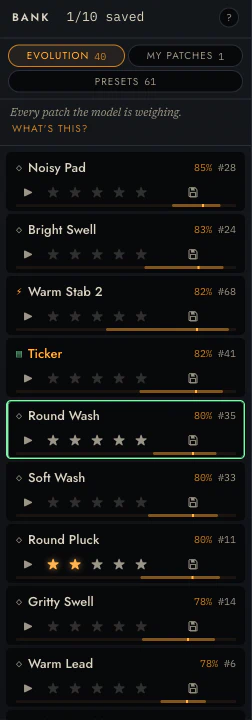
The rail on the left holds three of them:
| Bank | What it is |
|---|---|
| evolution | The live pool the model reasons over and breeds from |
| my patches | What you saved. Yours, permanent, never evicted |
| presets | The hand-made library, browsed in place |
The ? in the bank head walks you through what a generation is and what evolving costs.
Reading a row
Each row carries a name, an id, a prediction, stars and a save control:
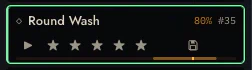
- The name is generated from what the patch is, and you can rename it.
- The percentage is the model's prediction: roughly, how likely you are to prefer this patch in a duel. It is blank when the model has no basis for a claim.
- The bar under the row is the same value, drawn.
- ▶ plays the standard sample.
- ★★★★★ rates it. This is an observation and it teaches the model.
- 💾 saves it. This is storage and it teaches nothing.
Stars are not saves
Two controls, two unrelated jobs.
★ is a judgement. It enters the observation log as an ordinal rating and moves the taste posterior. Rate honestly, including rating things low.
save is storage. It copies the patch into my patches and exempts it from eviction. It records nothing about your preferences.
Merging them is tempting and wrong. The pool evicts its lowest-utility members, so the moment a rating decides what survives, people rate strategically to protect patches, and every protective over-rating is a preference you never held.
The evolution pool is a working set with a fixed size, and breeding a generation evicts its weakest members. A patch you starred but did not save can be evicted. Stars are for teaching; save is what keeps.
Eviction and pins
The pool holds 40 vetted candidates. Injecting children removes the weakest to make room, by posterior utility.
(The engine's library default is 48; the web app asks for 40. If you see 48 quoted in the reference, that is why.)
Saving pins a patch so eviction skips it. Pins are capped at a quarter of the pool, so it can never be pinned solid and leave the search nowhere to put new candidates. The head shows your pin budget when you are near it.
Presets
Sixty-one hand-made patches across seven families — bass, lead, keys, pad, texture, perc, weird — browsed in place: clicking one loads it on the workbench without adding it to the pool.
They are worth playing through early even if you intend to evolve everything. They are what the warm start samples from, and they cover the palette's range more evenly than the prior does.
Keyboard
The bank is a single tab stop. Reach it with Tab, then:
| ↑ ↓ | Move the cursor |
| Enter | Open the patch |
| 1–5 | Rate |
| m | Save |
The save key is m rather than s because s is a note in the computer keymap, and note letters get through even when a control has focus. Binding save to it would have played a D every time.
Rows announce their full state to a screen reader (name, id, saved, rating, prediction), because the row's buttons sit outside the tab order and the label has to carry what they encode.