PLAY — the patch
One patch, in full, playable while you take it apart.
PLAY shows a single patch as its whole rack: every module, every cable, every knob at its true position. It is running live the entire time. Turn a knob and you hear it on the next note you play.
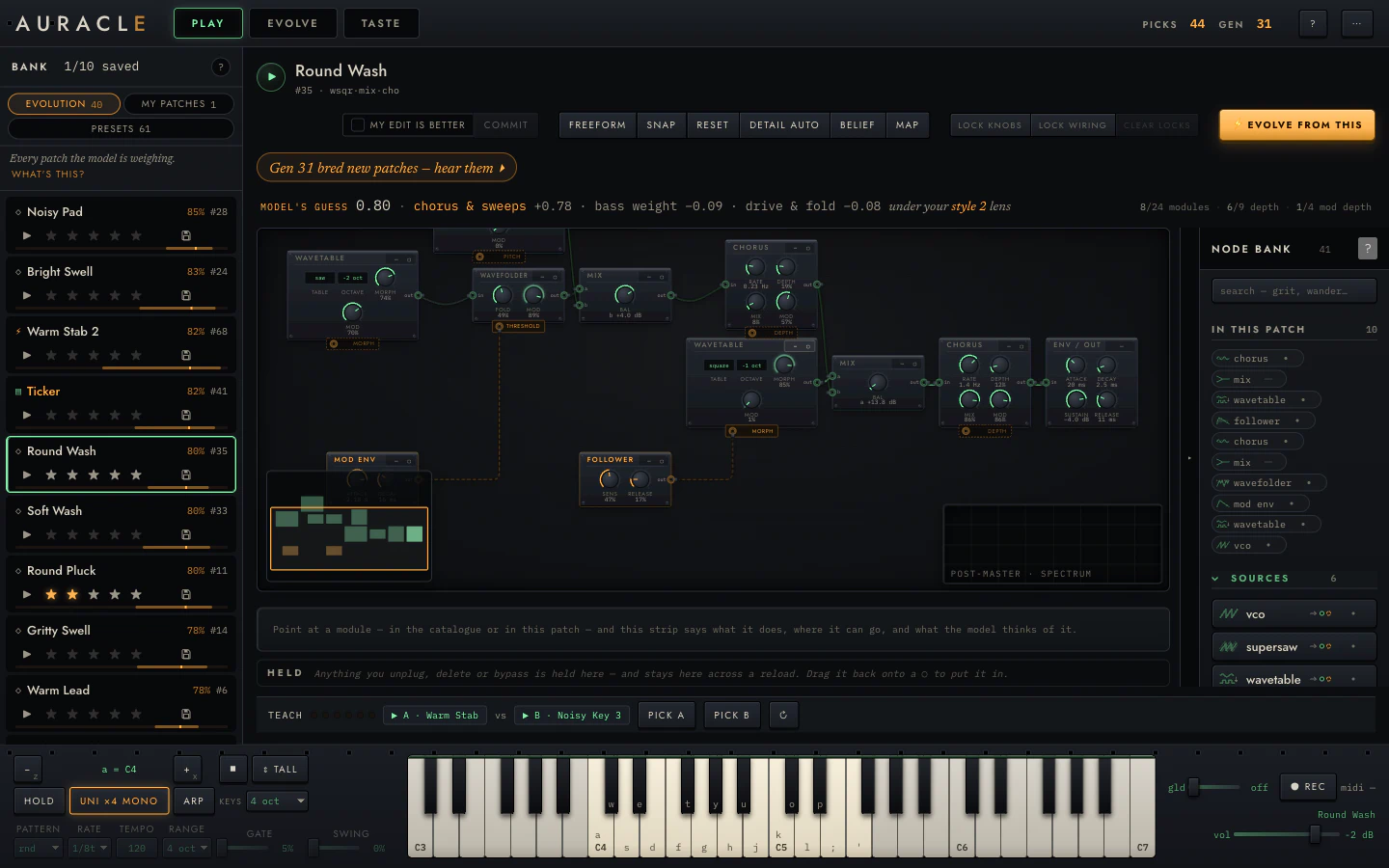
What is on screen
From the top:
The subject block. The patch's name, its id, and a short structural summary
(wsqr·mix·cho). The ▶ plays the standard sample.
The toolbar. The edit controls (commit, my edit is better), the layout and view controls (freeform / chain, snap, reset, detail, belief, map), the locks, and ⚡ evolve from this. All covered in Reading and editing the rack.
The next-step chip. An amber line that always says what to do now ("Gen 31 bred new patches — hear them ▸"). It is a suggestion; clicking it takes you there.
The belief row. What the model thinks of this patch and why:
MODEL'S GUESS 0.80 · chorus & sweeps +0.78 · bass weight −0.09 ·
drive & fold −0.08   under your style 2 lens
That is a prediction (how likely you are to prefer it in a duel), the three coordinates contributing most, and which style lens is currently judging it. When the model has no basis for a claim, this row says so instead of printing a number. See Reading what it learned.
Beside it, the budget: 8/24 modules · 6/9 depth · 1/4 mod depth. These
are the ceilings evolution searches within. A hand-built patch past them is
refused, and one at them has no room left to grow.
The rack. The patch itself. See the rack chapter.
The scope. Bottom right of the frame, tracing the output while you play. Configurable from ⋯ → Scope & analyser… (waveform or spectrum, tap point, FFT size, colour, corner, size, trigger, freeze).
The spec strip. The line under the rack that describes whatever you are pointing at, in the catalogue or in the patch.
HELD. The staging tray. Anything you unplug, delete or bypass lands here instead of vanishing, and stays across a reload. Drag it back onto any lit ○ to put it in.
The quick-pick strip. TEACH plus the current duel pair, so you can vote without leaving PLAY.
The keyboard dock. Playing it.
The three things PLAY is for
Hearing a patch properly
The standard sample is five seconds and identical for every patch, which is what makes candidates comparable. It is not a performance, though. Play the patch from the keyboard. Hold a chord. Run the arpeggiator. A patch that sounds thin on the sample can be excellent under your hands, and the sample cannot tell you that.
Changing it
Every knob is live and every structural edit is a grammar operation, so you cannot break the patch into something unplayable. Drag knobs, click selectors, drag cables between typed jacks, arm a module from the catalogue and place it. Undo with ⌘Z.
Changes are staged until you commit. Committing inserts the edited patch into the bank as a new candidate, leaving the original alone.
Aiming the search
This is the part that is easy to miss. Lock the knobs or the wiring you like, then press ⚡ evolve from this: refinement mutates everything except what you locked. Locked addresses are excluded from the search outright. See locks.
Find a patch whose character you like but whose envelope is wrong. Lock every knob except the envelope. Evolve. You get variations that differ only where you allowed them to.
Getting a patch here
- Click any row in the bank.
- Click the ⌖ on either side of a duel in EVOLVE.
- Click any dot on the taste map.
All three land the patch on the workbench, live and editable.